Friday, September 21, 2018

Compare Expensify vs XPenditure side by side Receipt scanning results

This is an update to last blog pot RE receipts, Im going with Expensify for Receipts and MoneyLuver for daily budgeting. Ill update in a year on how it goes

Xpenditure Ill pass on for now,..it has too much and not enough in OCR Categorizing

Compare Android Receipt Apps

and

PC Mags Comparison of Expense Tracking Apps

image

Friday, September 14, 2018

Christa’s Install Profile: Phone, Computer, Browser Tools

Items in yellow are very important

Phone

:
     Go Here and copy to phone: Y:\Work\_Profile\InstallProfile\PM\PhoneApps
     WiFi Connection Manager-com.roamingsoft.manager-160-v1.6.5.8.apk
     TypeApp-com.trtf.blue-12967-v1.9.4.13.apk
     To-Do-com.microsoft.todos-83-v1.37.83.apk
     Task Manager-com.rhythm.hexise.task-66-v2.3.5.apk
     Remote Utilities-com.remoteutilities.mviewer-68200-v11.18.apk
     Quickoffice-com.quickoffice.android-1503111803-v6.5.1.12.apk
     QuickEdit-com.rhmsoft.edit-85-v1.3.6.apk
     Outlook-com.microsoft.office.outlook-267-v2.2.168.apk
     NordVPN-com.nordvpn.android-227-v2.8.6 playstore.apk
    Keep Screen On-eu.aboutall.android.tools.kepscreenon-3-v1.2.apk
     Hacker's Keyboard-org.pocketworkstation.pckeyboard-1039003-v1.39.3.apk
     FAST-com.netflix.Speedtest-88-v1.0.8.apk
     Excel-com.microsoft.office.excel-2001479445-v16.0.9330.2080.apk
    ES File Explorer-com.estrongs.android.pop-636-v4.1.7.1.24.apk
     DS file-com.
synology.DSfile-292-v4.11.0.apk
     Drives-com.mobile_infographics_tools.mydrive-4019-v4.0.1.9.apk
     App Backup & Restore-mobi.usage.appbackup-10-v1.0.9.apk
     AnyDesk-com.anydesk.anydeskandroid-40004-v4.0.4.apk


Computer


Chrome Extensions: Go here and add them:

https://chrome.google.com/webstore/category/extensions?hl=en-US&utm_source=chrome-ntp-launcher
    
         AdBlock
         Boomerang for Gmail
         Chrome Remote Desktop
         Copy All Urls
         Lightshot OneNote Web Clipper
         Belt.IO
         Multi Forward for Gmail

   Programs to Install: (will install on new computer)


         VirtualCloneDrive
         OneNote (Office)
         MoveMouse
         CCleaner
         Malwarebytes Anti-Malware
         HijackThis
         Notepad++
         Lightshot
         WinRar
         Remote Utilities: Remote Desktop Software
         Any Desk

         ClickOff
         WinDiff
         WinMerge
         Process Explorer
         Adobe
         PDF Architect
         ShareX screen Record
         PointerFocus
         Open Live Writer (blog) + MS Office

        NORD VPN
    

Browser Links : Use Copy All Urls Chrome Extension to copy/paste

    Online Tools for remote PM/BA/Devs

Items in Yellow, u will NEED them:
     CloudNotes
         https://shrib.com/#christac3
         https://belt.io/belt
         https://keep.google.com/u/0/
         https://www.blogger.com/blogger.g?blogID=7869834720503477406#allposts

    TextTools
         http://textmechanic.com/text-tools/basic-text-tools/addremove-line-breaks/
         https://www.quickdiff.com/
         https://www.online-convert.com/
         https://techinternets.com/copy_calc?do
         https://www.csgenerator.com/
         http://gifmaker.me/
         http://www.procato.com/misspeller/
         https://wordcounter.io   

         https://delim.co

        https://goodcalculators.com/data-storage-conversion-calculator/

    Diagrams
        https://www.draw.io/
         https://www.pdfescape.com/windows/

    CloudStorage

        https://drive.google.com/drive/u/0/my-drive
         https://onedrive.live.com/about/en-us/
         http://67.8.252.232:5000/

Reminders

    https://www.futureme.org/  

    https://ohdontforget.com/

DeveloperForums
         https://stackoverflow.com/users/881314/jason-doyle
         https://github.com/
         https://www.w3schools.com/
         http://jsbin.com/uLECIyu/1/edit?html,css,js,output
         http://rextester.com/

Wednesday, September 12, 2018

Screen Recording Open Source Tool : Latest and Greatest ShareX

Save screen captures as Gif or Video or image

See my creen recording: https://i.imgur.com/0KzslPV.gifv

https://getsharex.com/
ShareX

A fine choice if you want to share your screen recordings online

Capture as video file or GIF

Dozens of export options

Also great for static screen grabs

Unintuitive interface

Not suitable for games

ShareX is an open source app for capturing still screen grabs and recording videos. There are no watermarks or time limits to worry about, but the interface isn't the most intuitive in the world so you’ll be best off using keyboard shortcuts. For quick reference, you can start a recording by tapping Shift + Print Screen, and stop it again using Ctrl + Shift + Print Screen.

You can also use this free screen recorder to save your capture as a GIF rather than a video file, which can be extremely useful for sharing on forums and social media.

Not only is ShareX a brilliant free screen recorder, it can also capture an entire scrolling webpage, capture and identify text via OCR, and even capture your screen according to a schedule.

Another of its best features is the ability to send your captured grabs and videos straight to a file-sharing or social media site. There’s a vast array of options, which you can check out on the project’s site.

Unfortunately, ShareX doesn’t support taking screen grabs or recordings from games running in full-screen mode. Other than that, it’s a superb screen recorder that will serve you extremely well.

Tuesday, September 11, 2018

Use Tesseract OCR with C# to separate receipt images from non-text images

Using TesseractEngine C# wrapper to identify image with text, based on default confidence and learning, flag image as either to move or not to move. This method returns a List<> of file names that can then be used to move the files to a separate directory.


This comes in handy when you have a dump of Phone Images with Camera images mixed with Receipts. You can either manually move files or use this to reduce the manual burden. See attached zip, and here for details of source lib and demo.

More Samples here

Download Source Here

App is run with following params:

ReceiptMover ocr c:\temp\input c:\temp\output *.jpg .4

/// <summary>
        /// Convert image to tif and OCR using TesseractEngine 3.0.2
        /// </summary>
        /// <param name="imgPath"></param>
        /// <param name="dataPath"></param>
        /// <param name="minconf"></param>
        /// <returns></returns>
        static bool OCRImage(string imgPath, string dataPath, float minconf)
        {

           bool r = false;
            bool doKill = false;
            string newPF = imgPath;
            try
            {

               // create tif if neeeded,
                var ext = FileHelper.GetFileNameExtension(imgPath);
                if (!ext.ToUpper().StartsWith("TIF"))
                {
                    WriteLine("CONVERT TO TIF ->....... " + FileHelper.GetFileName(imgPath));
                    using (var imgB = new Bitmap(imgPath)) // Load of the image file from the Pix object which is a wrapper for Leptonica PIX structure
                    {

                       string newF = FileHelper.GetFileName(imgPath).ToUpper().Replace(ext.ToUpper(), "tif".ToUpper());
                        newPF = Paths.Combine(FileHelper.GetFilePath(imgPath), newF);
                        if (File.Exists(newPF))
                            FileHelper.KillFile(newPF);
                        imgB.Save(newPF, System.Drawing.Imaging.ImageFormat.Tiff);
                       
                        WriteLine("SAVED  TO TIF ->....... " + newPF);
                        doKill = true;
                    }
                }


               //ocr tif ,if any text we seperate it from non receipt/text images
                using (var tEngine = new TesseractEngine(@"./tessdata", "eng", EngineMode.Default)) //creating the tesseract OCR engine with English as the language
                {
                   
                    using (var img = Pix.LoadFromFile(newPF)) // Load of the image file from the Pix object which is a wrapper for Leptonica PIX structure
                    {
                        WriteLine("TesseractEngine.Process(img) start at ->....... " + FileHelper.GetFileName(imgPath) + ", " + DateTime.Now.ToString());
                        //using (var page = tEngine.Process(img, PageSegMode.Auto)) //process the specified image
                         //using (var page = tEngine.Process(img)) //process the specified image
                        using (var page = tEngine.Process(img, PageSegMode.SingleColumn)) //process the specified image
                        {

                       
                            WriteLine("TesseractEngine.Process(img) END at -> " + FileHelper.GetFileName(imgPath) + ", " + DateTime.Now.ToString());
                            var text = page.GetText(); //Gets the image's content as plain text.
                                                       // var textO = page.GetHOCRText(0); //Gets the image's content as plain text.
                            WriteLine("tEngine.GetText(img) END at -> " + FileHelper.GetFileName(imgPath) + ", " +  DateTime.Now.ToString());

                           if (!string.IsNullOrEmpty(text))
                            {
                                text = text.Trim().Replace("/n", "");
                            }
                            if (StringUtil.IsValid(text))
                            {

                               Debug.WriteLine("Found text: " + text); //display the text
                                var conf = page.GetMeanConfidence();
                                WriteLine("GetMeanConfidence-> " + conf.ToString()); //Get's the mean confidence that as a percentage of the recognized text.
                                if (conf >= minconf)
                                {
                                    WriteLine("****Found RECEIPT: " + FileHelper.GetFileName(newPF)); //display the text
                                    r = true;
                                }

                           }
                            else
                            {
                                WriteLine("NODATA: " + FileHelper.GetFileName(newPF)); //display the text
                            }

                       }
                    }
                }
            }
            catch (Exception e)
            {
                WriteLine("OCRImage Error: " + e.Message);
            }
            //remove temptiff
            if (doKill)
            {
                FileHelper.KillFile(newPF);
            }
            return r;
        }


Wednesday, September 5, 2018

Code Fiddle Tools!

Some of the coolest coding fiddle sites I have found, really good for those who code and want to share or collaborate remotely plus some other tools like code formatting and conversion,. All in all the below sites are related to coding, code formatting or code conversions in the realm of languages that I use daily:

C#, JS, SQL + some text tools like online diff/csv tools. Stuff developers do every day and not always in the IDE:


Fiddles:

JS Fiddle: what started it all!

Rextester (really cool online fiddle tool, multi languages!! (I found it WAY better than SQL Fiddle which doesn’t always work)

DotNetFiddle for the .net folks

C# Pad

jsbin – every knows this

ALL FIDDLES

Format/Conversion/Translate

SQLTidy

SQL FSQL Format (like tidy)

SQL Convert so cool!

C# Prettify

Text Tools:

Shrib share a note in the cloud

Text Mechanic fix anything with txt like line breaks ect

Delim Tool CSV tool

Diff Online

Misc:

Visual Studio/TFS Online (what else can I say)

Use VLC to Start Streaming Playlist and Control via Browser :

1. Start a stream of your fav playlist, I am using VLC 2.8

example command: Stream playlist to port 8085

cd "C:\Program Files\VideoLAN.2.8\VLC"
vlc.exe -I dummy -vvv C:\Temp\MyPlayList.xspf --sout=#transcode{vcodec=none,acodec=mp3,ab=192,channels=2,samplerate=44100}:http{mux=raw,dst=:8085/} :sout-keep

More Help and My Previous Post on VLC Streaming

2. Router: Port forward to port (8085) on router to IP:port (see cmd dst=:8085)

3. Phone: Listen to your stream from internet (listen to your music from anywhere!!!)

Get your port from whatsmyip

See Figure 3

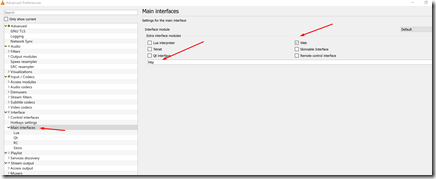
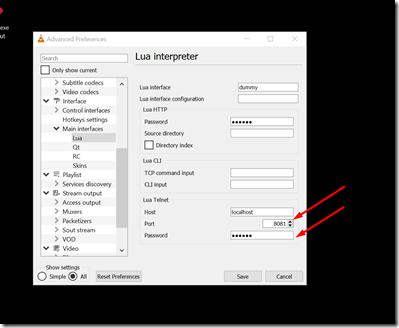
4. VLC: Control VLC playlist (Next/previous ect) using web interface setup:

4.a: See Figure 1 and Figure 2

4.b: Port forward to : IP:LuaPort (from Figure 2)

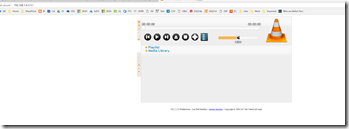
4.c: You can now control via browser! (see Figure 4:


Figure 1:

image

Figure 2:


image


Figure 3:


Figure 4:

image

Saturday, September 1, 2018

Change Windows 10 Default View in Search Results

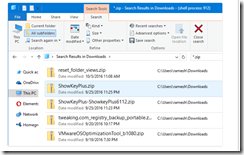
After a search Windows 10 shows content view , which for me is useless, I prefer View Details view to appear however Win10 engineers prove this useless content view as the default search results. To change this there is a great reg file solution to tweak Win10 to show Details instead of Content View. Great little tweak to add to your bag of tweaks!


Reg Tweak courtesy of winhelponline

Windows Registry Editor Version 5.00

;Fixes search results defaults to Content view.
;Sets Details view as default search results view for Generic folders.

[-HKEY_CURRENT_USER\SOFTWARE\Classes\Local Settings\Software\Microsoft\Windows\Shell\BagMRU]

[-HKEY_CURRENT_USER\SOFTWARE\Classes\Local Settings\Software\Microsoft\Windows\Shell\Bags]

[HKEY_CURRENT_USER\SOFTWARE\Classes\Local Settings\Software\Microsoft\Windows\Shell\Bags\AllFolders\Shell\{7fde1a1e-8b31-49a5-93b8-6be14cfa4943}]
"LogicalViewMode"=dword:00000001
"Mode"=dword:00000004


Restart explorer.exe or reboot

Yuck!:

image


Instead!:

image