WinSxS (short for Windows Side-by-Side) is the official Windows Component Store, located at C:\Windows\WinSxS. It acts as the core file repository for the Windows operating system.
Instead of keeping system files scattered across various directories, Windows stores the master copies of all system components, drivers, optional features, and updates inside WinSxS.
What WinSxS Is Used For
Side-by-Side Execution ("DLL Hell" Prevention):
It allows different applications to run different versions of the same system DLL or assembly simultaneously without overwriting or interfering with one another.
Windows Updates & Rollbacks:
When Windows installs an update, it adds the new version of a file to WinSxS while preserving the old version. This allows you to safely uninstall updates if something goes wrong.
Enabling/Disabling Windows Features:
Features like Hyper-V, IIS, or .NET Framework 3.5 can be enabled or disabled instantly without inserting installation media because the files are already staged in WinSxS.
System Repair:
Built-in repair commands like sfc /scannow and dism /online /cleanup-image /restorehealth use WinSxS as the reference folder to repair corrupt or missing system files.
Check if you need Cleanup
A. The DISM Command Line (Most Thorough)
Open PowerShell or Command Prompt as Administrator:
(Note: Using /ResetBase permanently commits installed updates and prevents you from uninstalling current updates, but yields the maximum disk space recovery).
How to Run the Cleanup
Run one of the following commands in an Elevated Command Prompt or Elevated PowerShell (Run as Administrator):
Option 1: Standard Recommended Cleanup (Safe & Reversible)
Removes superseded components while keeping the ability to uninstall recent Windows Updates if needed:
Purges all older versions of components completely. This yields the maximum possible disk space savings, but removes the ability to uninstall currently installed Windows Updates:
The process can take anywhere from 5 to 20 minutes depending on your CPU and drive speed.
It may appear to pause at certain percentage marks (like 10% or 20%)—this is normal while it processes hard links and file references in the background.
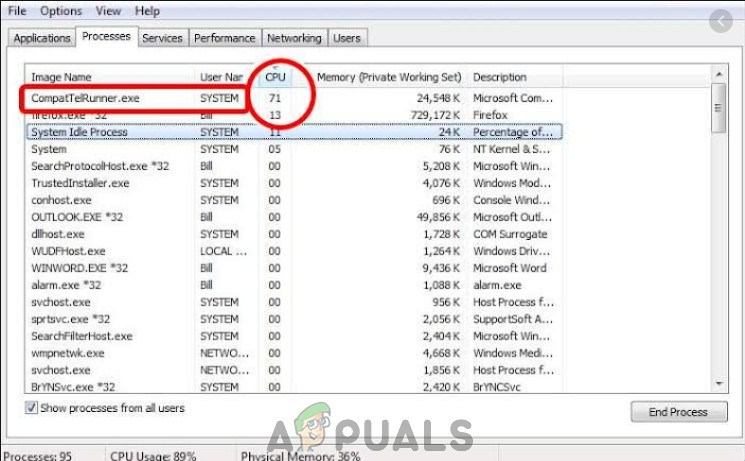
This process CompatTelRunner.exe is a process that is used to upgrade your system to the latest OS version or other Service Pack upgrades. It is also used to perform diagnostics on your computer to determine if there is the possibility of compatibility issues and collects program telemetry information if opted-in to the Microsoft Customer Experience Improvement Program. It allows Microsoft to ensure compatibility when you want to install the latest version of Windows OS.
CompatTelRunner.exe
is part of a Windows Update, specifically the KB2977759 one, which stands as the Compatibility update for Windows 7 RTM (Release to Manufacturer). The update is one of the many that serve as a preparation to upgrade to the latest OS version, and will
This process takes up storage bandwidth which may slow down your PC, and you will most likely want to get rid of it. Users complained of multiple CompatTellRunner.exe files showing up in the Task Manager consuming CPU and Disk Usage.
Though this process isn’t really necessary and can be deleted. If you do want Microsoft to diagnose your system by itself and run the compatibility checks, then let it run. This can be a privacy concern for some.
The CompatTelRunner.exe file is located in the System32 folder and is owned by the TrustedInstaller any modifications you try to do to it will be met with an “Access is denied” error, which means that you can’t modify or delete it in any way. This is because the process is owned by TrustedInstaller, and everything else only has Read-Only permission over it and you can’t modify it.
There is a solution for the issue, and it involves taking ownership of the process, after which you can delete it without deleting the entire Windows update and save yourself from problems OR you can let the program stay, and just disable Scheduled Tasks which launches the program.
Method 1: Take Ownership And Then Delete the CompatTellRunner.exe
The process is a fairly straightforward one, but make sure not to skip steps and keep in mind that you should be logged in as an administrator. First of all, open your Start menu by pressing the Windows key on your keyboard, or by clicking the Windows icon at the end of the taskbar.
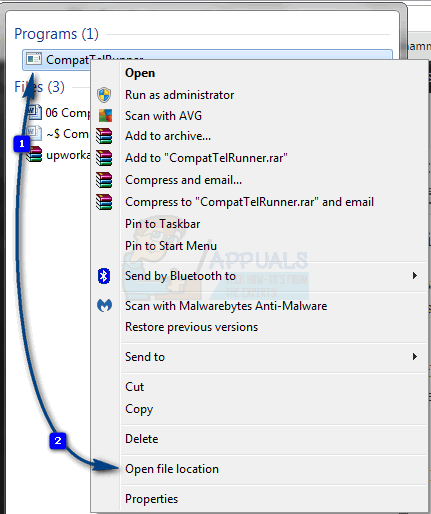
Type compattelrunner.exe in the search box, but don’t open the result, which is a file named compattelrunner, and instead right-click on it and select Open file location from the dropdown menu
Open File Location
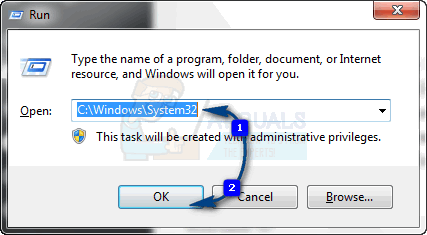
OR Hold the Windows Key and Press R. Type C:\Windows\System32 and type CompatTelRunner.exe in the search bar on the top right.
Open System32 Folder
Once inside the folder, right-click the Compattelrunner.exe file within it, and select Properties from the menu. In the window that opens, you will notice a Security tab, select it and click on the Advanced button inside. Once the window opens, find the Owner tab, and select Change owner. This will give you a list of new owners, after which you should select the account you are using, and click Apply. You will be met with a prompt that warns you to close all Properties windows that are currently open to change the ownership, so close them.
When you’ve changed the owner of the file, next you should change the permissions. To do that, right-click the Compattelrunner.exe file again, and open Properties. Go to the Security tab and click Advanced once again. Within the window, select Permissions, and from the list that pops out, select the account you are using. You will see a new window with options about the permissions. At the top, under the Allow column, select Full Control and click Apply.
When you’re done with this, you are the owner of the file, not TrustedInstaller, and you have full control over it, meaning you can delete it without being met with the Access is denied error. Feel free to do so, and you won’t see it taking over much-needed resources from your system.
Take Ownership of the File
While there are some solutions you might run into that will tell you to delete the entire update, KB2977759, doing so is not a smart idea as this will mess with the entire schedule of Windows Updates, and you might have bigger issues in the future. Follow the aforementioned steps to safely delete the file and you will have your computer running again in no time.
PRO TIP:If the issue is with your computer or a laptop/notebook you should try using Fortect Repair which can scan the repositories and replace corrupt and missing files. This works in most cases, where the issue is originated due to a system corruption. You can download Fortect by Clicking Here
Method 2: Disable CompatTelTunner.exe from Task Scheduler
Hold the Windows Key and Press R. Type taskschd.msc and click OK.
Open taskschd.msc
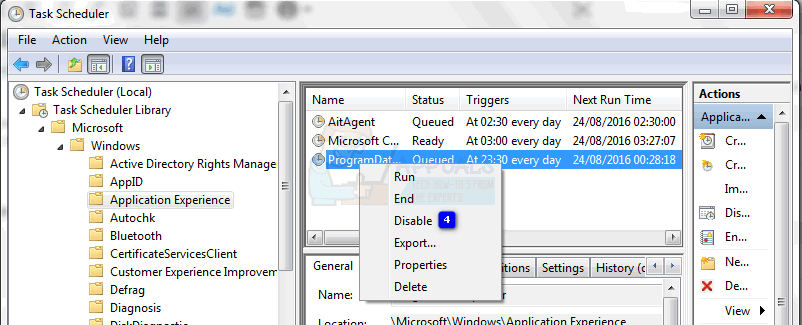
Expand Task Scheduler Library -> Microsoft -> Windows -> Application Experience
Open Application Experience Experience
Right-click on any of the tasks listed as Microsoft Compatibility Appraiser and choose Disable.
Disable Microsoft Compatibility Appraiser Tasks
Method 3: Switch Feedback and Diagnostics to Basic
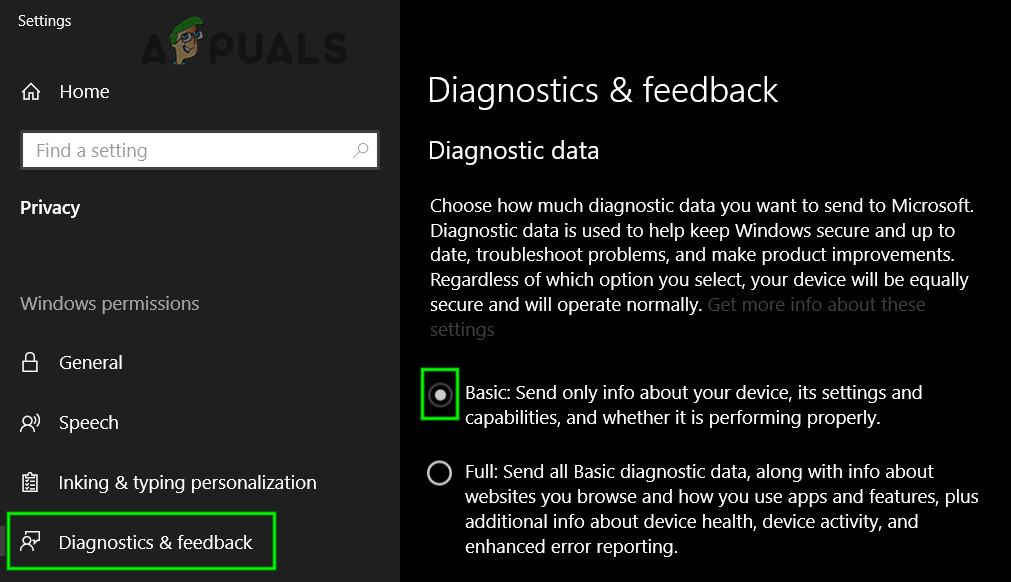
CompatTelRunner.exe uses the Feedback and Diagnostics data to update your system to the latest version. If Feedback and Diagnostics setting is enabled fully, then CompatTelRunner.exe may use excessive system resources. In that case, changing Feedback and Diagnostics settings to basic may solve the problem.
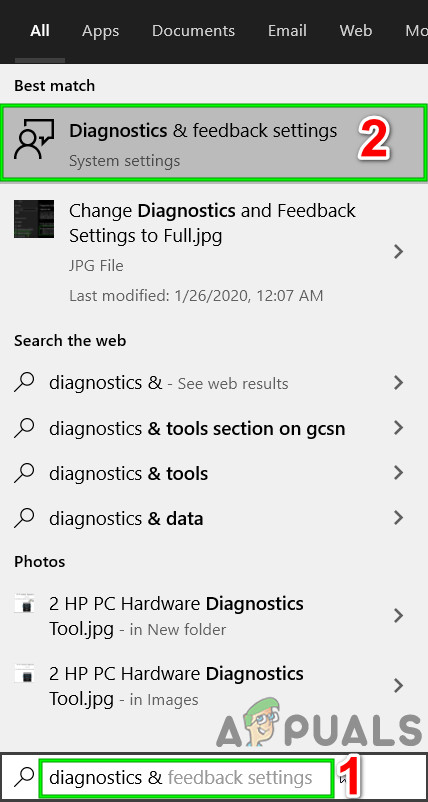
Press the Windows button, type “Feedback & Diagnostics.Open Diagnostics & Feedback Settings
Now in the right pane of the window, select “Basic“.Change Diagnostics & Feedback to Basic
Now restart the system and check if your system’s usage has decreased.
Method 4: Disable Connected User Experiences and Telemetry Service
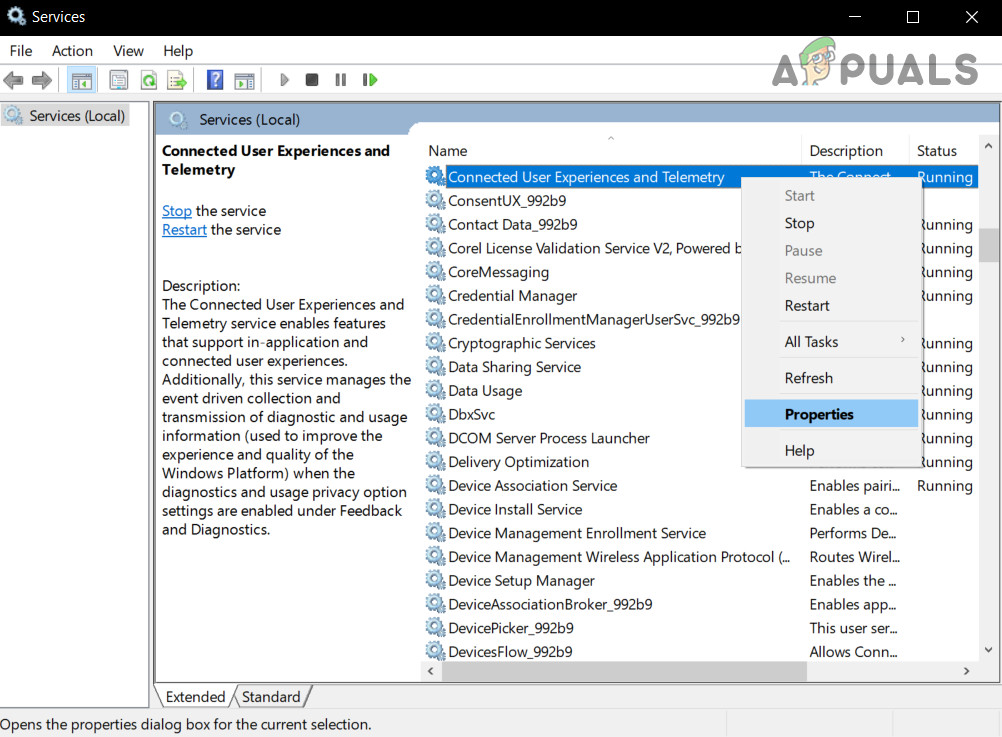
Previously called Diagnostics Tracking or DiagTracK, now called “Connected User Experiences and Telemetry“, is a Windows service that runs in the background to automatically send data to Microsoft. This service is responsible for the transmission of diagnostic and usage information to Microsoft. Disabling this service may solve the problem of high CPU usage.
Press Run, services.mscOpen Services
In the Services window, find and right-click Connected User Experiences and Telemetry service and then click on Properties.Open Properties of Connected User Experience and Telemetry
Now in the General tab, click on the dropdown box of Startup type and then select Disabled. Now click on Apply and OK.
Change Startup Type of User Experience and Telemetry. to Disabled
Restart your computer.
Method 5: Removing Telemetry and Data Collection
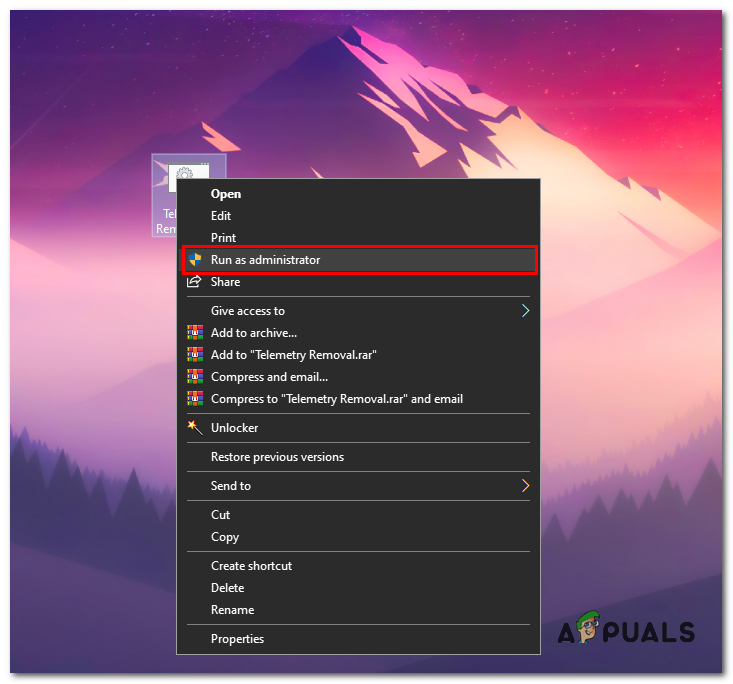
If none of the methods above solved this problem for you, you will have to use a Telemetry Disabling script file that we have created for you. It will decrease the load on your computer and increase your privacy by disabling some of the diagnostic and telemetry services of Windows 10. Follow the steps below:-
Copy the below script to a notepad file and save as TelemRemove.bat