List of SMS Gateways as of August 2023 for most U.S. based Cell Phone carriers
Send an SMS message to a recipient without incurring the cost or complexity of setting up an SMS Gateway, Great for small scale and quick notification solutions
a. How To View Folder Size Google Drive – Using Add-On [Working]
b. Ganapthy has written an add-on which can be found in the Google Workspace Marketplace for free. It can be used to do different functions on Google Drive. Especially checking the Google Drive size of the folder
a. How to see the folders size in Google Drive | Without using any software | Google Colab
i. Want to know how to see the size of folders in google drive or folders which are inside parent folders. This video is exactly for same and we'll see how to find out folders size without downloading any external software with the use of Google Colab in this video
iii. Sample Results
Microsoft Edge on Windows 10 is great....but...can be slow sometimes.
For me Edge Chromium on Windows 10/11 is an exceptional alternative to
Chrome & integrates nicely with Office365, however it can get slow over
time. For me on my SurfaceGo 1.6Ghz *GB Ram tablet this was especially the case.
Below is a list of tweaks applied to boost the load time, execution time, cpu usage
and RAM usage of the Edge Chromium browser on windows. Many settings can be
utilized with Chrome to, just replace edge:flags with chrome:flags and seek the
flag name. Some settings are platform specific such as the new Startup Boost
feature from MS for Edge, if I had time
I noted otherwise please be aware.
1. 1.Sync: Sync only whats needed, turn off sync when
not neede

2. Flags: Browse to edge://flags/
3. edge://flags/#enable-lazy-image-loading = enabled
4. edge://flags/#enable-heavy-ad-intervention = enabled
5. edge://flags/#enable-lazy-image-loading = enabled
6. edge://flags/#enable-heavy-ad-intervention = enabled
7. edge://flags/#allow-previews = disabled
8. edge://flags/#disable-accelerated-video-encode = disabled
9. edge://flags/#disable-accelerated-video-decode = disabled
10. edge://flags/#enable-quic = enabled
11. edge://flags/#lite-video-default-downlink-bandwidth-kbps = enabled
12. edge://flags/#back-forward-cache = enabled
13. edge://flags/#edge-experimental-tracking-prevention-features = enabled
14, Others:
edge://flags/#lite-video-default-downlink-bandwidth-kbps = 400
and
edge://flags/#quiet-notification-prompts = Enabled
15: Settings: edge://settings/system

16: New Performance Mode:
--enable-features=msPerformanceModeToggle
1.
First of all,
right-click on the Edge Canary desktop shortcut and select “Properties”.
2.
Navigate to the target
field in the Shortcut tab, add a space, and then paste the following
parameter: --enable-features=msPerformanceModeToggle
3.
Click the Ok button
and restart the browser to apply the latest changes.
4.
Finally, head to
Settings >> System >> and enable the “Performance Mode” toggle
button available under the Optimize Performance section.
Startup boost ad Kids Mode Discussed over here:

I am seeking an easy to use, feature rich yet clean link management tool with some basic collaboration features and video timestamp compatibility functionality. In short I need a tool to help save video time stamps, take notes on those time stamps and organize the links into categories. This helps with research and/or education activities. Specifically I need a tool that allows me to save YouTube time stamp bookmarks and then easily play them back. I compared several tools in 2020. Below are ratings for most of the tools that I used including comments on usage & screen recordings that demo each app. Specifically I am seeking the following features:
1) Link management : save, tag, organize links
2) Has an Android App
3) Has a PC App / Chrome Extension
4) Allow Save and Play of time stamped video links.
5) Basic collaboration
get an Intro into the world of Bookmarking Tools
DetailsRating: 3
Android App: Y; Chrome Extension: N; Web App: N; PC Install: Y
Comments: Android basic functionality, no share to option. PC requires an install.
Screen Recording Demos:
Rating: 2
Android App: Y; Chrome Extension: N; Web App: N; PC Install: Y
Comments: Copy of Linkeep, looks and functions almost 100% the same. Only colors on UI are different.
Screen Recording Demos:
Rating: 3
Android App: Y; Chrome Extension: N; Web App: N; PC Install: N
Comments: Android app is great, integration between NewPipe, YouTube is clean and the UI is clean and concise with Categories and Links, The only complaint I have is search is limited to Categories only. On the PC side: I could not find any way to access links. I would use this app if it had a PC option?
Screen Recording Demos:
Rating: 2
Android App: Y; Chrome Extension: N; Web App: N; PC Install: Y
Comments: Seems like a clone of another link app like Keep Link Links Saver or vice versa. The integration with NewPipe & YouTube does not work; you can not share to KeepLink. Thus I had to create links manually, that on top of the mediocre UI and not PC option leaves me no option except to give it a 2 or 3.
Screen Recording Demos:
Rating: 3.5
Android App: Y; Chrome Extension: Y; Web App: N; PC Install: Y
Comments: Very feature rich productivity tool that includes more than just link management: this tool allows user to save, share and manage articles & links in lists. Its does exactly as it claims “Save the articles, new stories and videos you want to read and watch later to Pocket. “ Pocket also integrates ok with NewPipe and YoutTube, however there are some gotchas. Each list item has a category and includes tagging & favorite features plus more. On the PC side, a Chrome Extension provides near identical functionality to the app. If you are looking for a producutivy app to manage articles & vidoes this is an alternative to Diigo. IMHO it is not as feature rich as Diigo.
Cons: However, there are 2 BIG issues that prevent me from using pocket: 1) Saving a video link:No description/notes when saving a link and 2) Opening a Video Link: When I open it link in Andorid or PC the video goes to the 00:00 ignoring my timestamp. The Timestamp is only used if I share the list item to YouTube.
When saving a link (NewPipe or YouTube Share to Pocket) I can select a tag and nothing else. In short this tool is not timestamp friendly if you are saving several links in the same video.
Screen Recording Demos:
Rating: 4
Android App: Y; Chrome Extension: Y; Web App: N; PC Install: Y
Comments: Save bookmarks from anywhere easily and quickly. KeepLink is great at saving links. The Android app is very clean and it does 1 job very well: Saving & managing book marks. The UI in Android is modern and clean, rounded corners & searching is a great feature in this tool allowing multiple fields to search on. Bookmarked items include description, title, tag and category. Tag and category properties are extensible allowing user defined values for each.
Cons: There is only 1 list in the Lists. Having 100’s of items may become unwieldy. There is no PC / Chrome Extension I could in thus I was unable to use the bookmarks on a PC without copying/sharing from my phone to my email & opening on a PC. Hopefully this will be resolved in the future.
Screen Recording Demos:
Rating: 5
Android App: Y; Chrome Extension: Y; Web App: Y; PC Install: N
Comments: Extremely feature rich link, annotation and collaboration tool that includes all of my requested functionality and more. Annotations, tagging, description, notes, collaboration groups and seamless Android integration are all included in Diigo. The only tool that comes close is Pocket in terms of number of features and KeepLink in terms of the UI. Diigo does exactly what it claims to do and more: “Diigo Browser allows you to save, annotate and share bookmarks easily!”. Saved bookmark items including title, url, description, tag & group. Tag and group properties are extensible allowing user defined values for each. Group permits customizable authorization via an Admin setting, this feature permits expanded collaboration on items, articles, notes and annotations. This allows multiple users to edit an item, great for small teams working on research.
In android, sharing from NewPipe and YouTube to Diigo for time stamped links works perfectly and playing time stamped links open to the correct time marker on both PC and android.
Cons: The android app is a little clunky, due to it being its own browser. It just takes a little time to get use to. I recommend using the Chrome Extension first then using the Android app, this will decrease the learning curve.
Screen Recording Demos:
Android Usage using Saved Link
Finding the Best and Worst Android Receipt Management Apps with a focus on Scan, OCR & small business functionality,.
The following review focuses on finding a stable and affordable receipt tracking app that includes the following functionality either in the app directly or via the browser. Scan & OCR functions must reside in native app while reporting & settings may exist in browser. This is a summary review focusing on OCR accuracy, ease of use & functionality that can satisfy tax related use cases for small business/sole-proprietor.
1. Ability to scan a receipt via phone camera
2. OCR Capability for scanned receipts
3. OCR accuracy is > 90%
4. OCR picks up minimally following fields:
a. Pricve
b. Date of transaction
c. Merchant / Store Name
d. Category – Filled 90% with accuracy at or above 50%
5. Scan & OCR will involve at most 2 user events: Camera Click & Button Click.
6. Pricing either :
a. Subscription of < 5$ per month for 1-2 user or
b. 100$ one time for life of product
7. Ability to create simple report &/or export including:
a. Transaction detail
b. Transaction Summary
8. Reports shall allow user to filter by Start / End Date
9. Export Report to csv
1. Ability to identify / resolve / merge duplicates
2. Ability to scan a receipt via email
3. Search feature allowing to find tx by merchant, amount and/or category
4. Customer service with chat capability or email response
5. Ability to import from another expense platform, E.g: Import from Expensify.
The following apps were downloaded & tested on Android 10 Kernel Version 4.9.193 on LG V40 model V405TA30b :
1. Create Account
2. Create 3 receipts: Scan & OCR, see #6 below
3. Verify fields populated by OCR:
Date
Merchant
Amount
Category
4. How many events to create a receipt?
5. What is the pricing amount & pricing model?
6. Sample Receipts used in testing
Apps failed due to 1 or more of the following conditions, noted by the leading symbol below : , denoted with leading in
1 - OCR in-accurate or non-existent
2 - pricing exceeds 5$ per month or $120 per year
1tap receipts Tax Calculator & Receipt Scanner
Test Results Notes:
1. Create Account - Easy, Google OAuth.
2. Create 3 receipts: Scan & OCR. - 1 step; process time: <1 hr
3. Verify fields populated by OCR: (% of 3 receipts)
Date - 100%
Merchant - 100%
Amount - 100%
Category - 100% Accurate!
4. How many events to create a receipt?
- 1 !
5. What is the pricing amount & model for app?
- $2.08 per MONTH! Billed annually!
Pricing Details:
More Info: support@1tap.zendesk.com
6. Ease of Use: - High
7. Pros: - Very accurate & fast, simple UI, great fit for small business who wants no frills & hughly accureate OCR receipt scanning
8. Cons: basic reporting, limited filtering, did not see a way to search for a receipt. Not
Receipt Scanner: smart receipts & expense tracker
Test Results Notes:
1. Create Account - Easy, Email.
2. Create 3 receipts: Scan & OCR. - 1 step; process time: <1 hr
3. Verify fields populated by OCR: (% of 3 receipts)
Date - 100%
Merchant - 100%
Amount - 100%
Category - 100% Accurate!
4. How many events to create a receipt?
- 1 !
5. What is the pricing amount & model for app?
- $3/ month paid yearly !
More Info: contact@easy-expense.com
6. Ease of Use: - High
7. Pros: - Very accurate & fast, Clean & simple UI, great summary dashboard. Info on importing: Break expensed into Biz/personal
8. Cons: limited browser, in work.
Zoho Expense - Expense Reporting and Approval
Test Results Notes:
1. Create Account - Easy, Google OAuth.
2. Create 3 receipts: Scan & OCR. - 1 step; process time: <1 hr
3. Verify fields populated by OCR: (% of 3 receipts)
Date - 100%
Merchant - 100%
Amount - 100%
Category - 0% Accurate!
http://prntscr.com/vcbpqa
4. How many events to create a receipt?
- 1 !
5. What is the pricing amount & model for app?
- 5$ per mos
6. Ease of Use: - High
7. Pros: - OCR was fast, however category not filled in, Many features for mid sized business.
8. Cons: OCR
Foreceipt - Receipt Scanner Expense Tracker Cloud
Test Results Notes:
1. Create Account - Easy, Google OAuth.
2. Create 3 receipts: Scan & OCR. - 1 step; process time: <1 hr
3. Verify fields populated by OCR: (% of 3 receipts)
Date - 100%
Merchant - 100%
Amount - 100%
Category - 0%
4. How many events to create a receipt?
- 2
5. What is the pricing amount & model for app?
- 3.99$ per mos (220 scans only)
6. Ease of Use: - High
7. Pros: - OCR was fast, however category not filled in, Many features for mid sized business.
8. Cons: OCR & pricing is only 200 scans per month
Test Results Notes:
1. Create Account - Easy, Google OAuth.
2. Create 3 receipts: Scan & OCR. - 1 step; process time: <1 hr
3. Verify fields populated by OCR: (% of 3 receipts)
Date - 100%
Merchant - 100%
Amount - 100%
Category - 0% Accurate!
4. How many events to create a receipt?
- 1 !
5. What is the pricing amount & model for app?
- 35$ per mos
https://www.waveapps.com/pricing
6. Ease of Use: - High
7. Pros: - OCR was fast, however category not filled in, Great features for mid sized business.
8. Cons: Category OCR and price!
1. Create Account - Easy, Email or Google OAuth.
2. Create 3 receipts: Scan & OCR. - 1 step; process time: Slow > 2 hours
3. Verify fields populated by OCR: (% of 3 receipts)
Date - 100%
Merchant - 100%
Amount - 100%
Category - 50%
4. How many events to create a receipt?
- 1 !
5. What is the pricing amount & model for app?
- 4.99$ per mos
https://www.expensify.com/pricingw
6. Ease of Use: - High
7. Pros: - OCR was slow, but accurate. Most fields filled in, duplicates management. Great features for mid sized business.
8. Cons: OCR is slow, Fees & overcharging, customer service.
Fyle: Receipt Scanner & Expense Reports
fail reason: 1
fail reason: 2
fail reason: 2
fail reason: 2
fail reason: 2
Veryfi - expenses, receipts & projects
fail reason: 2
Foreceipt - Receipt Scanner Expense Tracker Cloud
fail reason: 1
fail reason: 1
fail reason: 1
QuickBooks Online Accounting, Invoicing & Expenses
fail reason: 2
Free Expense Tracker & Budget Planner - Bookipi
fail reason: 1
MrReceipt - your receipts in one place
fail reason: 1
fail reason: 1
fail reason: 1
fail reason: 1
Browser/Admin UI:
https://my.1tap.io/my-expenses/overview/2020

Report Request

Report Output

OCR Results:

Browser/Admin UI:
https://app.easy-expense.com/
OCR Results:

Dashboard


Everything
Grep for Windows
Textpad
Visual Studio 2017
Notepad++
Text pad:
Searching for: public static string BuildURLTransactionDetail
Dir Structure: 15GB, 131K Files
Pattern: *.cs
Find in Files params: http://prntscr.com/uv0p5m
Results:
Memory: 21 MB
CPU: 25%
Elap Time: 55s,
App Results:
http://prntscr.com/uv0ulf
Found 4 occurrence(s) in 4 file(s), 53257 ms
Notepad++:
Searching for: public static string BuildURLTransactionDetail
Dir Structure: 15GB, 131K Files
Pattern: *.cs
Find in Files params: http://prntscr.com/uv0rew
Results:
Memory: 120 MB
CPU: 8%
Elap Time: 235s (3m55s!!),
App Results:
http://prntscr.com/uv0u5a
VS2017 Find in Files:
Searching for: public static string BuildURLTransactionDetail
Dir Structure: 15GB, 131K Files
Pattern: *.cs
Find in Files params: http://prntscr.com/uv0vh7
Results:
Memory: devenve.exe+15MB MB
CPU: 50%
Elap Time: 20s !!!
App Results:
http://prntscr.com/uv0wdt
Everything:
Searching for: public static string BuildURLTransactionDetail
Dir Structure: 15GB, 131K Files
Pattern: *.cs
Find in Files params: http://prntscr.com/uv10pt
Results:
Memory: 80MB
CPU: 10%
Elap Time: 5s !!!
App Results:
http://prntscr.com/uv0zl3
grepWin-2.0.4_portable:
Searching for: public static string BuildURLTransactionDetail
Dir Structure: 15GB, 131K Files
Pattern: *.cs
Find in Files params: http://prntscr.com/uv1656
Results:
Memory: 20MB
CPU: 20%
Elap Time: 10s !!!
App Results:
http://prntscr.com/uv16ta
If you have an app that interfaces with Google or use a 3rd party API integration, for example sendEmail smtp utility, you may start receiving an error in scripts that worked previously,. The error may look like:
C:\Temp\Tools\sendEmail-v156>Synch.OneWay.MyDocs.GDrive.Zip.Email
Sep 11 15:06:19 doylejsurface2 sendEmail[16576]: ERROR => ERROR => SMTP-AUTH: Authentication to smtp.gmail.com:587 failed.
To resolve enabel the less secure app access toggle in your Google profile:
Update Less secure app access in google
normally the setting is located here
Summary:
- most accurate
- most stable providing consistent results
- cleanest design
- consistent and reliable
Get it Yroo - Price Comparison and Price Tracker
*************** Reviews ***************
Amazon
found 3 prices, same as Yroo
Ebay
N/A
Performance:
Load time range: 4-6 seconds
CPU Impact: 5%
RAM: 5MB
Rating:
Pricing: 6 (Amazon: 9, Ebay: 0)
* Only works on amazon, Options screen is blank.
Amazon
DID NOT WORK
Ebay
DID NOT WORK
Performance:
N/A
Rating:
Pricing: 0
* Only works on amazon
Amazon
found 1 better price, compared to ebay
Ebay
N/A
Performance:
Load time range: 4-6 seconds
CPU Impact: 5%
RAM: 5MB
Rating:
Pricing: 6 (Amazon: 9, Ebay: 0)
* Only works on amazon
Amazon
found 10+ coupion code, no prices
Ebay
found 1 code, activated, no price compare
Performance:
Load time range: 1-3 seconds
CPU Impact: 5%
RAM: 5MB
Rating:
Pricing: 1, Coupon: 10
Amazon
works ok, quick price compare, comapres to ebay and others
Ebay
works OK, 14 second load time, compares to google and walmart. ** did not compare to amazon?
Performance:
Load time range: 5-15 seconds
CPU Impact: 10%
RAM: 30MB
Rating:
7
* Works on all sites, a little slow when loaded with other ext's
Amazon
works ok, quick price compare, comapres to ebay and others
http://prntscr.com/s7s4jt
http://prntscr.com/s7s5j9
http://prntscr.com/s7s5p3
Ebay
S/A
Performance:
N/A
Rating:
9
* Works on all sites, however the process is a pain:
1. select a price
2. enter email,
3. wait and go to my email to do a price check.
Very arduous. Too tedious. May be helpfule in a researching scenario, but not for day to day shopping.
Amazon
works 70% of the time, rest it did not pop up or displayed wrong product
Ebay
worked OK, 10 second load time, worked better than amazon.
Performance:
Load time range: 5-20-never seconds
CPU Impact: 10%
RAM: 30MB
Rating:
5
* Besides Yroo this is the ONLY tool that kind of worked.
- most accurate
- most stable providing consistent results
- cleanest design
- consistent and reliable
Rest of the add-on felt like hacks and/or beta products. For a solid and reliable price checking experience, go with Yroo.
These extensions can come in handy to analyze price over time, site (retailer) and volume.
are 2 of the best! Plus PriceGeeks site has some of the best price analytics spanning ebay Ended auctions for deep price history data to spot those future price trends !
More….
- Does not compare prices, only tracks. Must setup a price alert, use this for pricing research not for simple shopping price comparisons
- similar to Keepa - Amazon Price Tracker
- Does not compare prices, only tracks. Must setup a price alert, use this for pricing research not for simple shopping price comparisons
- similiar to Keepa - Amazon Price Tracker
- xPath Finder : point and click xpath selector
- CSS Peeper : Chrome Extension scrape css from site quickly with support for rules and great formatting
- Relative XPath Helper Chrome Extension
- Selectify : Alt+click any element to generate its optimum jquery selector path. Chrome Extension
-Lighthouse: It is an open-source, load and Performance Testing tool.
- Random Text Generation in MS Word / Office: function : = lorem([numParagraphs], [numLines]) ; e.g: = lorem(5,6)
See below Example:
- Universal Automation : Automate Job application submittals, save time and blast that resume!
Use Chrome Profile
Create profile with naming pattern like O365.[acronym] e.g: O365.SB
Login to portal.office.com
Open any other pages, e.g: Outlook, Word, Admin Center ect.
Set Home pages for profile to the open tabs
Now when you open the profile in the future all pages will be loaded and logged into, likewise you could use bookmarks in the new profile for similar shortcut access to O365 pages.
I tried Session Box, however it had problems with the varying domains, for example portal.office.com and https://outlook.office365.com/ were not in same session in Session Box. Isolation was based on portal.office.com only
3. Extra Notes on Lorem Ipsum generators:
- Text
Other apps to gen random text:
Visual Studio Extension: Dummy Text Generator
PowerPoint: same procedure as in Word
Word: As demo’d above: enter one of the following formulas in a document, replace the zero in parenthesis with the number of “number of paragraphs” & optional “number of lines”
=lorem(0): Custom length of lorem ipsum text
=rand(x,y): random selection of texts from the Word Help
=rand.old(0): a pangram repeated in custom length
QuarkXPress: The dummy text function is called jabberwocky
InDesign: Choose Type > Fill with Placeholder Text to
- Forms:
Form Samples: Best form generator
Forms Smart: various html samples
Generator + Form: Multi-Div FRormatted HTML with text:
Some very cool new apps on the scene, share data between computer and phone seamlessly, track your work, type smarter, work smarter spend less time searching.
https://zapier.com/blog/best-windows-productivity-software/
Pushbullet connects your devices, m aking them feel like one.Send texts, files, and links to and from all your devices
Share Clipboard between Phone and Computer!
Share Clipboard between muyltiple devices
Snap Windows Together
Tutorials: AWESOME!
https://www.youtube.com/watch?v=jdrH75ZAQIw
https://www.youtube.com/watch?v=2aW70A1Vdi0
How much time are you spending in each site? Where am I working/spending the most time in my day?
Automate Repetitive Computer Tasks as Macros
and
E1 vs E3 vs E5 ect.
So MS just cleared things up a bit or added dirt to the water even more depending on your view point.
I will break this into 2 areas: Developer Subscriptions and Business Subs.
MS announced June 2019 that Office 365 Developer is now 90 day auto-renewing, changing from yearly expiring. This now means A) tenant can be preserved over time without need to move to a new tenant or pay subscription at end of year and B) you need to refresh+access your dev tenant at least every 90 days to ensure the subscription does not expire. .
Start here : subscription is an Office 365 Enterprise E3 Developer subscription with 25 user licenses. It lasts for 90 days and is free to use for development
New Office 365 Developer Subscription expiration rules
O365 Developer Subscription via Visual Studio Subscription
- VS Professional= 249 per yr includes O365 Dev Sub
https://my.visualstudio.com/benefits
O365 Developer Subscription via Direct
- 90 Day Free or
- Yearly Paid Sub : 99 per yr (or 8$ per mos)
https://developer.microsoft.com/en-us/office/dev-program
Excellent Step by Step how to Create
and
See Data into O365 Tenant and SharePoint Online
and
Azure Hybrid Setup w/ Azure Credits
Your developer subscription includes the following:
Exchange Online (Plan 2)
Flow for Office 365 Plan 2
Microsoft Forms (Plan E5)
Microsoft Planner
Microsoft Stream for Office 365 E5 SKU
Microsoft Teams
Mobile Device Management for Office 365
Office 365 ProPlus
PowerApps for Office 365 Plan 2
SharePoint Online for Developer
Skype for Business Online (Plan 2)
Sway
To-Do (Plan 3)
What is NOT includes:
PowerBI (PowerBI for free)
Azure Subscription + Azure Functions
Develop PowerApps, Azure Functions and Flow
https://docs.microsoft.com/en-us/azure/azure-functions/functions-create-first-azure-function
https://collab365.community/how-to-use-microsoft-powerapps/
http://blog.sharedove.com/adisjugo/index.php/2018/11/29/extending-powerapps-and-flow-part-1-adding-custom-data-sources-through-azure-api-apps/
The following table lists what automatically happens when you assign a license to someone:
If the subscription has this service
This automatically happens
Exchange Online
A mailbox is created for that person.
SharePoint Online
Edit permissions to the default SharePoint Online team site are assigned to that person.
Skype for Business Online
The person will have access to the features associated with the license.
Office 365 ProPlus
The person will be able to download Microsoft Office on up to 5 Macs or PCs, 5 tablets, and 5 smartphones.
See here more info
List of registry keys that can start a program when Windows boots. Applies to Windows 9x thru Win10, see reference articles here and here
These drivers are loaded first as they are required for the proper operation of hardware such as storage devices. Boot device drivers will be located under the following key and have a Startvalue equal to 0.
Registry Keys:
HKEY_LOCAL_MACHINE\System\CurrentControlSet\Services
1 )Windows will now perform various tasks
2) start the Winlogon process.
3) Then starts the service control manager that loads services & drivers that are set for auto-start.
Windows Auto-start Services & Drivers –The (SCM) process (\Windows\System32\services.exe), will now launch any services or drivers that are marked with a Start value of 2.
Registry Keys:
HKEY_LOCAL_MACHINE\System\CurrentControlSet\Services
- This key is designed to start services when a computer boots up. These entries may continue running even after you log on, but must be completed before the
HKEY_LOCAL_MACHINE\...\RunOnce registry can start loading its programs.
Registry Keys:
HKEY_LOCAL_MACHINE\Software\Microsoft\Windows\CurrentVersion\RunServicesOnce
HKEY_CURRENT_USER\Software\Microsoft\Windows\CurrentVersion\RunServicesOnce
- This key is designed to start services as well. These entries can also continue running even after you log on, but must be completed before the HKEY_LOCAL_MACHINE\...\RunOnce registry can start loading its programs.
Registry Keys:
HKEY_LOCAL_MACHINE\Software\Microsoft\Windows\CurrentVersion\RunServices
HKEY_CURRENT_USER\Software\Microsoft\Windows\CurrentVersion\RunServices
The Windows logon prompt is shown on the Screen. After a user logs in the rest of the keys continue.
Notify - This key is used to add a program that will run when a particular event occurs. Events include logon, logoff, startup, shutdown, startscreensaver, and stopscreensaver. When Winlogon.exe generates an event such as the ones listed, Windows will look in the Notify registry key for a DLL that will handle this event. Malware has been known to use this method to load itself when a user logs on to their computer. Loading in such a way allows the malware program to load in such a way that it is not easy to stop.
Registry Key:
HKEY_LOCAL_MACHINE\SOFTWARE\Microsoft\Windows NT\CurrentVersion\Winlogon\Notify
- This key specifies what program should be launched right after a user logs into Windows. The default program for this key is C:\windows\system32\userinit.exe. Userinit.exe is a program that restores your profile, fonts, colors, etc for your user name. It is possible to add further programs that will launch from this key by separating the programs with a comma. For example:
HKLM\Software\Microsoft\Windows NT\CurrentVersion\Winlogon\Userinit =C:\windows\system32\userinit.exe,c:\windows\badprogram.exe.
This will make both programs launch when you log in and is a common place for trojans, hijackers, and spyware to launch from.
Registry Key:
HKEY_LOCAL_MACHINE\Software\Microsoft\Windows NT\CurrentVersion\Winlogon\Userinit
- This value contains a list of comma separated values that Userinit.exe will launch. The default shell for Windows is explorer.exe, though there are legitimate replacements that have been made. When userinit.exe starts the shell, it will first launch the Shell value found in HKEY_CURRENT_USER. If this value is not present, it will then launch the value found in HKEY_LOCAL_MACHINE.
Registry Key:
HKEY_CURRENT_USER\Software\Microsoft\Windows NT\CurrentVersion\Winlogon\\Shell
HKEY_LOCAL_MACHINE\Software\Microsoft\Windows NT\CurrentVersion\Winlogon\\Shell
The rest of the Autostart locations will now be processed.
- These keys are designed to start programs synchronously for current machine or user. Entries in these keys are started once The RunOnce keys may be ignored in Safe Mode depending on OS version.
Registry Keys:
HKEY_LOCAL_MACHINE\Software\Microsoft\Windows\CurrentVersion\RunOnce
HKEY_LOCAL_MACHINE\Software\Microsoft\Windows\CurrentVersion\RunOnceEx
Windows 10 : Run keys (machine, all users)
- These are the most common startup locations for programs to install auto start from. By default these keys are not executed in Safe mode. If you prefix the value of these keys with an asterisk, *, it will run in Safe Mode.
Registry Keys:
HKEY_LOCAL_MACHINE\Software\Microsoft\Windows\CurrentVersion\Run
HKEY_CURRENT_USER\Software\Microsoft\Windows\CurrentVersion\Run
Windows 10 : Run keys (individual user)
Windows XP, NT, 2000:
Autostart folder of the current user
Win 9X, ME
c:\windows\start menu\programs\startup
Windows XP
C:\Documents and Settings\LoginName\Start Menu\Programs\Startup
Autostart folder of all users
Windows XP
C:\Documents and Settings\All Users\Start Menu\Programs\Startup
Windows NT
C:\wont\Profiles\All Users\Start Menu\Programs\Startup
Windows 2000
C:\Documents and Settings\All Users\Start Menu\Programs\Startup
Windows 10:
Autostart folder of the current user
Autostart folder of all users
These keys are designed to be used primarily by Setup programs. Entries in these keys are started once and then are deleted from the key. If there is an exclamation point preceding the value of the key, the entry will not be deleted until after the program completes, otherwise it will be deleted before the program runs. This is important, because if the exclamation point is not used, and the program referenced in this key fails to complete, it will not run again as it will have already been deleted. The RunOnce keys are ignored under Windows 2000 and Windows XP in Safe Mode. The RunOnce keys are not supported by Windows NT 3.51.
Registry Key:
HKEY_CURRENT_USER\Software\Microsoft\Windows\CurrentVersion\RunOnce
- These keys are generally used to load programs as part of a policy set in place on the computer or user.
Registry Keys:
HKEY_LOCAL_MACHINE\Software\Microsoft\Windows\CurrentVersion\Policies\Explorer\Run
HKEY_CURRENT_USER\Software\Microsoft\Windows\CurrentVersion\Policies\Explorer\Run
Load Key - This key is not commonly used anymore, but can be used to auto start programs.
Registry Key:
HKEY_CURRENT_USER\Software\Microsoft\Windows NT\CurrentVersion\Windows\load
AppInit_DLLs - This value corresponds to files being loaded through the AppInit_DLLs Registry value. The AppInit_DLLs registry value contains a list of dlls that will be loaded when user32.dll is loaded. As most Windows executables use the user32.dll, that means that any DLL that is listed in the AppInit_DLLs registry key will be loaded also. This makes it very difficult to remove the DLL as it will be loaded within multiple processes, some of which can not be stopped without causing system instability. The user32.dll file is also used by processes that are automatically started by the system when you log on. This means that the files loaded in the AppInit_DLLs value will be loaded very early in the Windows startup routine allowing the DLL to hide itself or protect itself before we have access to the system.
Registry Key:
HKEY_LOCAL_MACHINE\Software\Microsoft\Windows NT\CurrentVersion\Windows
ShellServiceObjectDelayLoad - This Registry value contains values in a similar way as the Run key does. The difference is that instead of pointing to the file itself, it points to the CLSID's InProcServer, which contains the information about the particular DLL file that is being used.
The files under this key are loaded automatically by Explorer.exe when your computer starts. Because Explorer.exe is the shell for your computer, it will always start, thus always loading the files under this key. These files are therefore loaded early in the startup process before any human intervention occurs.
Registry Key:
HKEY_LOCAL_MACHINE\SOFTWARE\Microsoft\Windows\CurrentVersion\ShellServiceObjectDelayLoad
SharedTaskScheduler - This section corresponds to files being loaded through the SharedTaskScheduler registry value for XP, NT, 2000 machines. The entries in this registry value run automatically when you start windows.
Registry Key:
HKEY_LOCAL_MACHINE\SOFTWARE\Microsoft\Windows\CurrentVersion\Explorer\SharedTaskScheduler
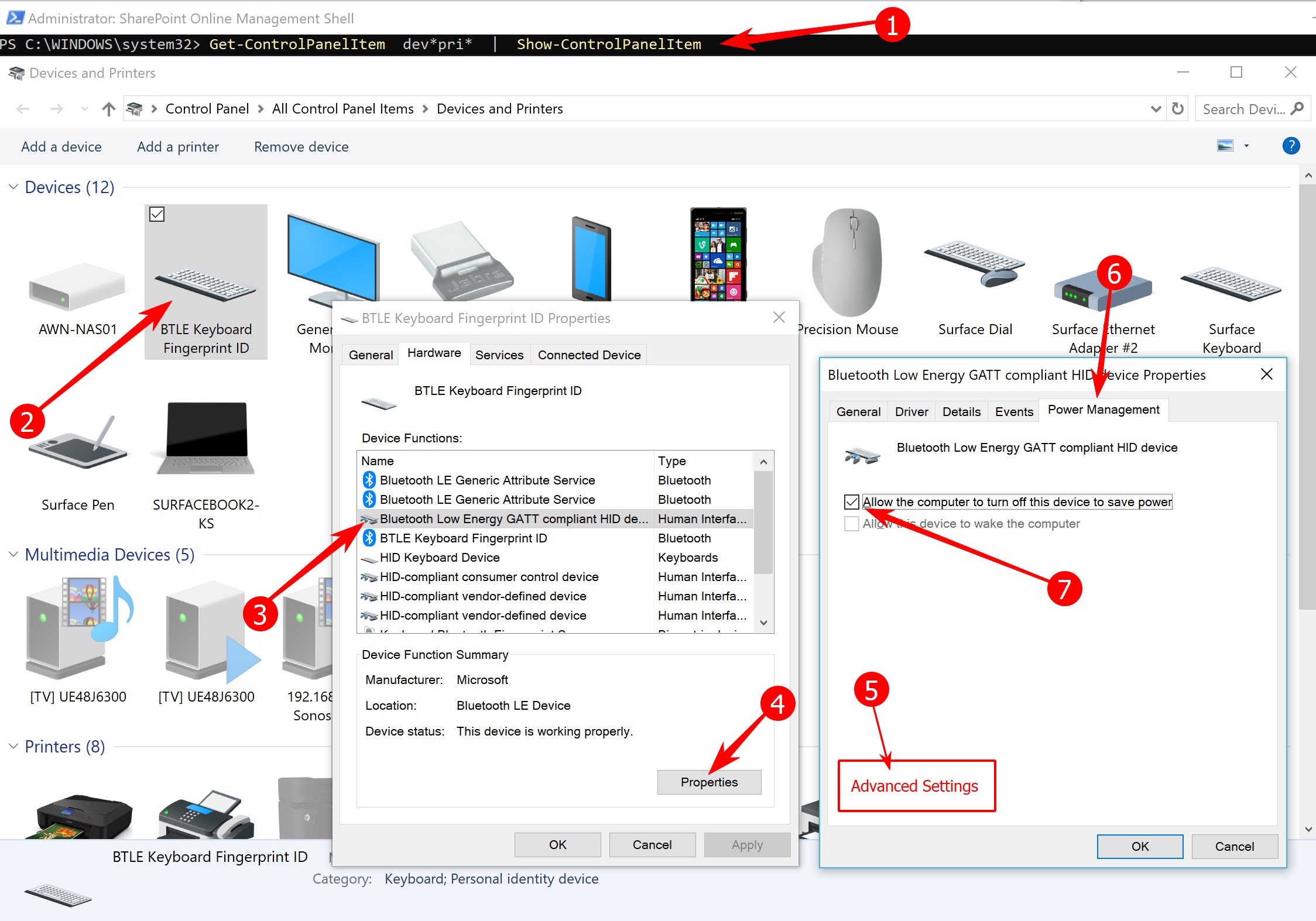
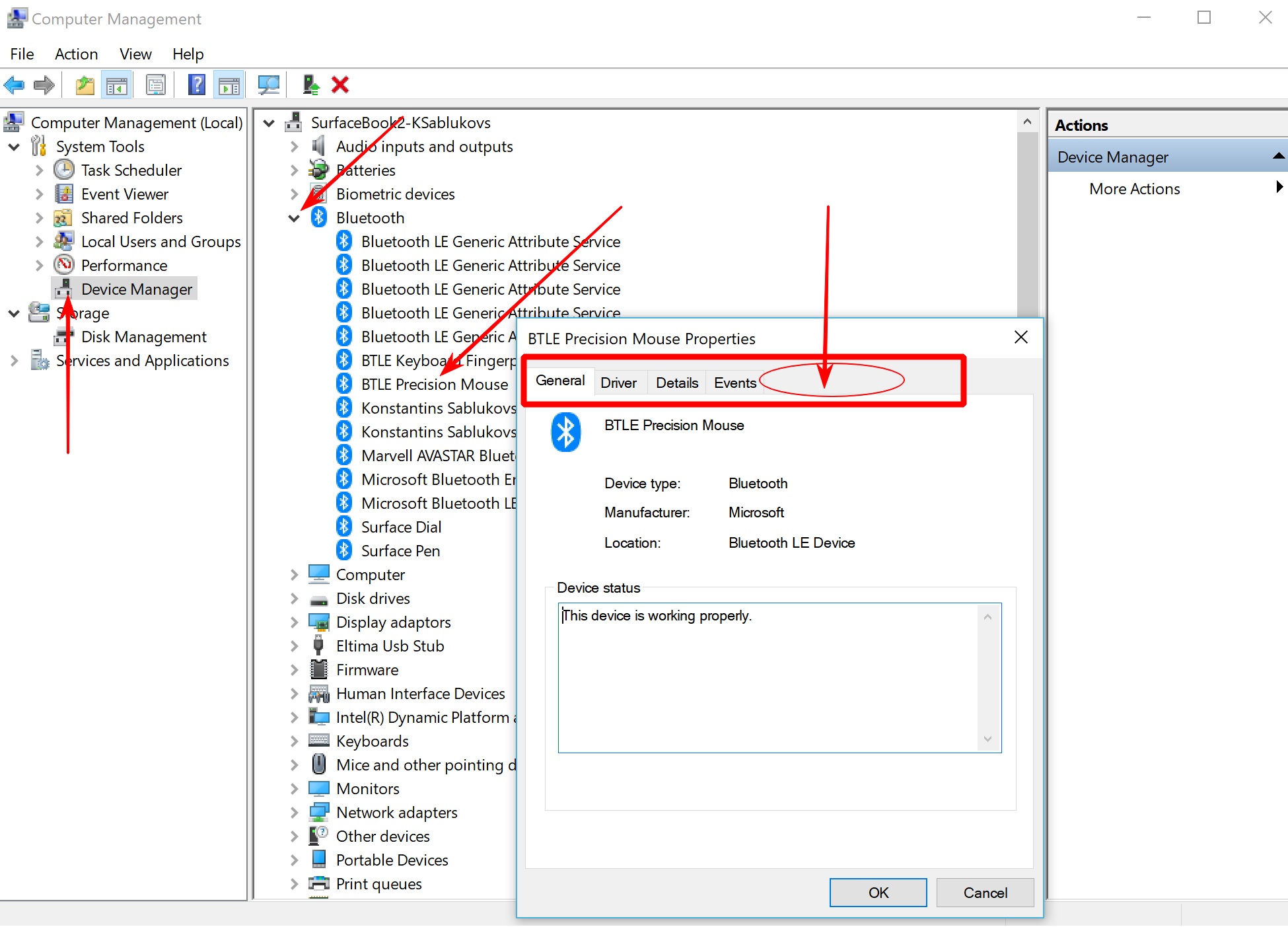
IF you have issues with a bluetooth mouse or keyboard dropping connection or does not connect when computer awakes / reboots, then the below info will assist. When this issue occurs, most white papers direct us to update the Power Management tab for Bluetooth drivers associated with the peripheral. However starting somewhere around build 1700 or 1800 of Win 10 the Power Management tab is missing from the driver prop tabs. Thus we need a reg hack to bring back the Power Management tab; Now we can adjust the Power Management settings associated with the specific BT driver for the peripheral, in my case a Logitech Ultra Thin Mouse
1) create a reg key and set value to 0
Open RegEdit and move to HKEY_LOCAL_MACHINE\SYSTEM\CurrentControlSet\Control\Power
If it's not created : create new DWORD key, name = CsEnabled , value= 0.
Restart the machine, now check the driver. To view a driver for a specific peripheral the below screenshot show step by step :
Slave a drive using this for example:
SATA/PATA/IDE Drive to USB 2.0 Adapter Converter Cable for 2.5 / 3.5 Inch Hard Drive / 5 inch Optical Drive with External AC Power Adapter
https://www.amazon.com/AGPtek-Drive-Adapter-Converter-External/dp/B00BIE996S/
Recuva Free
https://www.ccleaner.com/recuva/features/undelete-files-on-your-computer
Anydata recovery
https://www.tenorshare.com/data-recovery/how-to-recover-deleted-data-windows-10.html
undelete:
http://www.undelete360.com/
undeleete+
https://undelete-plus.en.softonic.com/comments
Misc Info:
https://www.howtogeek.com/169344/how-to-recover-a-deleted-file-the-ultimate-guide/
References:
Gmail Filters : Exhaustive Syntax Documentation
Some advanced Gmail Filter topics
** Note ** : Gmail does NOT support search using partial matches, instead GMail
only supports while word searches. E.g: This does not work: “Find emails that contain any word that starts with Driv%” , The
To and From are the only fields that allow p[artial searching, e.g: find emails that are from @ally.com
Just copy aand paste the below searches into the Gmail search text box to test
From is from a certain domain:
from:(@ally.com)
from:(@ally.com | @expediamail.com)
same as
from:(@ally.com OR @expediamail.com)
Before/After Date
before:2018/9/1
after:2018/9/1 before:2018/11/18
Before/After Relative Date (instead of specific date)
newer_than:2d
older_than:30d
Search multiple labels!
label:(sent OR inbox)
label:(sent OR inbox) Indeed
label:(awork-jobs OR awork-jobs-jobsites) Indeed
label:(awork-jobs OR awork-jobs-jobsites) older_than:30d
Requirement:
When an incoming email is received the email shall be saved to a label .\AWork\Jobs\Insurance if the email contains the word Cigna and if the email was not sent from jdoyle@MyDomain.NET
(Create the label first if it does not exist)
Search:
from:(-from jdoyle@MyDomain.NET) Cigna
Filter:
Gmail Filter Syntax Examples for and/or searching:
OR
to:adam OR subject:iPhone
is same as
{to:adam subject:iPhone}
AND
to:adam AND subject:iPhone
is same as
to:adam subject:iPhone
is same as
(to:adam subject:iPhone )
() parens -> AND
{} brackets -> OR
e.g: I need to move emails from Inobx into, I want to move emails based on following requirements:
If incoming email contains the words job or opportunity or contract and email is NOT from a job site alert, then save email to .\AWork\Jobs
If incoming email contains the words job or opportunity or contract and email is NOT from a job site alert AND email has the word Melbourne in it, then save email to .\AWork\Jobs\Melbourne
If incoming email contains the words job or opportunity or contract and email is NOT from a job site alert AND email has the word remote or telecommute in it, then save email to .\AWork\Jobs\Remote
.\AWork\Jobs
(job | opportunity | contract) -{remote from:{alert@indeed.com alerts@ziprecruiter.com inmail-hit-reply@linkedin.com noreply@updates.freelancer.com noreply@updates.freelancer.com info@mail.glassdoor.com noreply@glassdoor.com dartcontainer-jobnotification@noreply.jobs2web.com}} -in:chats
Looks like this:
.\AWork\Jobs\Melbourne
Search:
Find all job emails for melbourne area that are NOT from an automated job site like indeed or ziprecruiter and not in my chats.
(in:anywhere (job | opportunity | contract) (melbourne | "Palm Bay" | Cocoa) -subject:Enterprise -("car rental") -{remote from:{alert@indeed.com alerts@ziprecruiter.com inmail-hit-reply@linkedin.com noreply@updates.freelancer.com noreply@updates.freelancer.com info@mail.glassdoor.com noreply@glassdoor.com dartcontainer-jobnotification@noreply.jobs2web.com}} -in:chats)
Filter:
.\AWork\Jobs\Remote
Search:
((remote | telecommuting | telecommute | remoting) -from:{jdoyle@jrdtechnologies.net alert@indeed.com alerts@ziprecruiter.com inmail-hit-reply@linkedin.com noreply@updates.freelancer.com noreply@updates.freelancer.com info@mail.glassdoor.com noreply@glassdoor.com dartcontainer-jobnotification@noreply.jobs2web.com})
Filter:
When saving a filter be sure to use these options to move an email to a label:
below applies to Google search

https://www.labnol.org/internet/advanced-gmail-search/21623/
http://sirlagz.net/2015/04/27/searching-gmail-with-wildcards/
(online2|online3|online4).provider.com


![image_thumb[9]](https://blogger.googleusercontent.com/img/b/R29vZ2xl/AVvXsEiggSuHDTaMm3eSrQzuxCTCiLtofZQpup-UkFTE6tNa-98a5yVD8R49a6T5elj_PWOehp3vIYsgP0tCB6AVKQ6JOzvZ-TffQX42VMUIRG2gXg6Mo4niyWfARmv2i22aUR5fwwn3xko-rss/?imgmax=800 "image_thumb[9]")
![image_thumb[1]](https://blogger.googleusercontent.com/img/b/R29vZ2xl/AVvXsEgtHU62brtzmPG8ioFFExhriKz65PzFM8y02tKIQqjSy08vuYWCmTT1Y-BH21jvxUZUdCPKvlcUGSOWY1YptSO9AfDEECS0ZJcz60hL8IQ1zLB_fvsr4tRa0I1CLNY20GvQ4p9iTDJJeIg/?imgmax=800 "image_thumb[1]")
![image_thumb[3]](https://blogger.googleusercontent.com/img/b/R29vZ2xl/AVvXsEgei9R6acnslLLrEee3eLwEp1ZEkT-sabSsNQsIibqfyfdMZjl_2OQepHcBTQzKG0fXKnP2FS-KjS2bmm9lPKO8NdqeV3pvz53bKKGUcrKtu6c17bncmv3Hd8XqcRiRjPKs-2zzQQvsMJE/?imgmax=800 "image_thumb[3]")
![image_thumb[5]](https://blogger.googleusercontent.com/img/b/R29vZ2xl/AVvXsEjlXwuiXVZChkMWAlrDbqXMQnS-CKUi4OlQC-0K4xm9GzyIOXFz-4iUcc6PukXaVuFqbQk1kYwGhivaeci38hX188GUqfYeJwG6TbkbdPmDufZ__mNNkb5XWc9xM5sWlKnzw3pvHFove4A/?imgmax=800 "image_thumb[5]")
![image_thumb[7]](https://blogger.googleusercontent.com/img/b/R29vZ2xl/AVvXsEgCYavos-0uVcJ8H25-PZ-7T0dESrBAAlLV3ERdGUzEwVs-PIMzoUbFAVMlCstDX1h2OpYXZq_kww-tHgIpV-XxQgUkU2HNU5jbU1iGEbdlaECY-2an-yGYYmOWFN88HVwfrfiAivNDkys/?imgmax=800 "image_thumb[7]")