Showing posts with label Android. Show all posts

Tuesday, July 1, 2025

Add ‘Open Bash Here’ into Visual Studio

 With the rise of cross-platform development, the need for Linux tools like bash has become more prevalent, even in Windows environments. Developers often need to run bash scripts for tasks such as deploying services to Azure or managing containers. An integrated bash prompt in Visual Studio, opening directly at a file’s location, can significantly streamline this process. Here we create a script amd config.VS to run it


Why

In a mixed development environment where Windows and Linux tools are both essential, there’s a challenge: Windows uses a different file path structure compared to Linux. When developing on Windows with Visual Studio but needing to run Linux-based tools (like bash scripts), there’s a disconnect — the paths don’t translate automatically between systems. This is where a Linux script comes into play.


Creating the script

To bridge this gap, we created a Linux script that performs path translation. It takes a Windows file path as input, converts it into a Linux-friendly path, and then opens a bash shell at that location.


vi ~/.open-wsl-bash.sh


#!/bin/bash

win_path=$1

# Replace single backslashes with double backslashes

win_path=${win_path//\\//\\\\}

# Translate the Windows path to WSL path

wsl_path=$(wslpath -u "$win_path")

# Navigate to the directory and open bash

cd "$wsl_path" && exec bash

Script Breakdown

#!/bin/bash: Shebang line to indicate the script uses bash.

win_path=$1: Assigns the first argument passed to the script to win_path.

win_path=${win_path//\\//\\\\}: Doubles the backslashes to escape them properly for bash.

wsl_path=$(wslpath -u "$win_path"): Uses wslpath to convert the Windows path to a WSL path.

cd "$wsl_path" && exec bash: Changes to the directory and opens a new bash shell.

This script is an essential piece of the puzzle for a seamless development experience across Windows and WSL environments.


Adding the External Command in Visual Studio

Find the path to wt.exe.

Navigate to Tools > External Tools.

Click “Add” and configure:

Title: Open Bash Here

Command: Path to your wt.exe.

Arguments: --profile "Ubuntu-20.04" -- bash -c "bash ~/.open-wsl-bash.sh '$(ItemDir)'"

Initial directory: $(ItemDir)

Visual Studio: Adding external command

“Ubuntu-20.04” is the name of my Linux Windows Terminal profile. Change it to your Linux profile name.


Conclusion

With this setup, you’ll have a seamless “Open Bash Here” command in Visual Studio that improves the development workflow by providing quick access to a Linux bash environment at the location of your current file.


Wednesday, August 2, 2023

List of SMS Gateways for Mobile Phone Carriers

List of SMS Gateways as of August 2023 for most U.S. based Cell Phone carriers


Send an SMS message to a recipient without incurring the cost or complexity of setting up an SMS Gateway, Great for small scale and quick notification solutions


Sunday, June 18, 2023

YouTube Watch Hitstory : Why is my YouTube History watch list filled with videos I haven't watched?


Why is my YouTube watch list filled with videos I haven't watched?

Symptoms:

My YouTube History watch list continues to be filled with unwatched videos. Why are there videos showing up in my history that I have not watched? Did my account get hacked?

·                        More Detail HERE

Example of hacked Google Youtube Account Video History:

·        


How to find the issue:

1. Go to this URL

                               YouTube Video History

                2. Look for videos that you did not watch / foreign for example, YoutUbe videos from India or China that are not English.

                3. If you find a video that you did not watch, document the estimated date that the video was watched.

                4. IF you find foreign videos in your history,


Troubleshooting: Basic

                5. IF your account was compromised / you find foreign videos in your history:

                                a. Go to https://myaccount.google.com/security?nlr=1

                                b. change your password and turn on 2FA

                                c. You can also Check your security here:

·         https://myaccount.google.com/security-checkup/3

·         https://myaccount.google.com/security?nlr=1

·         https://myaccount.google.com/device-activity

·         https://myaccount.google.com/notifications?pli%3D1=

·         https://myaccount.google.com/connections?filters=3,4&hl=en

·         Troubleshooting: Intermediate:

o   Remove all Extension on every browser client that supports extension, normally every windows machine.

o   Disable all mobile apps that have access to youtube account such as YouTueb Vanced or SmartTube.

o   Disable all YouTube alternative apps on Android TV

o   If above does not work, disable and logout of every deice for target Google Account: AndroidTV, Mobile and PC.

o    Use strong passwords, Undo SyncRemove unwanted extensions and toolbars, Disable autoplay mode

·         Troubleshooting: Advanced:

o   Create custom Google Script or Azure app to send alert when YouTube Watch history is updated with video anomaly, for example: Send email when a video shows in History that includes an Indian or Chinese language title.

o   See below refs for YoutUbe API examples:

§  https://groups.google.com/g/google-apps-script-community/c/NLiA-Cu9V3I

§  https://www.youtube.com/watch?v=QY8dhl1EQfI

§  https://www.youtube.com/feed/history

§  https://stackoverflow.com/questions/30849284/how-to-get-watched-history-of-youtube-user-using-youtube-javascript-api

§  https://stackoverflow.com/questions/73241866/how-to-get-watched-history-of-a-music-video-on-youtube-using-youtube-api

§  https://atonce.com/blog/how-to-get-youtube-api-key

§  https://saturncloud.io/blog/how-to-get-a-youtube-video-thumbnail-from-the-youtube-api/

§  https://github.com/matt8707/youtube-watching

§  https://www.reddit.com/r/YoutubeMusic/comments/w8naqu/youtube_ytmusic_history_api/

§  https://developers.google.com/youtube/v3/live/guides/auth/installed-apps

§  https://developers.google.com/youtube/v3/docs

§  https://developers.google.com/youtube/v3/sample_requests

§  https://stackoverflow.com/questions/23600372/how-to-get-all-your-watch-history-from-youtube?rq=4


Thursday, February 9, 2023

Android Context Menu : Long Press of text display Bing Search menu, Where did it come from?

What Android app is creating the menu 'Bing Search' in apps when long pressing text?

The Andorid app Outlook has an intent-filter in its Manifest file that enables it to show up in the long-press context menu when highlighting text. This intent-filter is disabled unless the feature flag "Edge Integration" is enabled.

<activity android:configChanges="0x4a0" android:enabled="false" android:label="@string/browser_bing_search" android:name="com.microsoft.emmx.webview.search.SearchBridgeActivity" android:theme="@style/BrowserDefaultLightTheme">
<intent-filter>
<action android:name="android.intent.action.PROCESS_TEXT"/>
<category android:name="android.intent.category.DEFAULT"/>
<data android:mimeType="text/plain"/>
</intent-filter>
</activity>

Now we know!


Tuesday, January 11, 2022

Export or Bookmark all open tabs from Android to Windows

Here we will try 2 different methods to achieve export and bookmark of all open tabs respectively,

 Export All Open Tabs from Android Chrome to Windows Chrome

1. You'll need to download and install Android Dev Tools on your computer, as well as set your mobile device to Developer Mode. Android Dev Tools can be downloaded and installed here.

We will only require the adb application, but we will still need to install the entire toolbox. Personally, I found it easiest to download and install Android Studio.

2. Put your Android phone in Developer's Mode and connect with a cable to your desktop. 

Here is how to set Dev Mode.

It's best to connect using a USB, because sometimes the device cannot be discovered by adb. Here is an official instruction how to turn it on. Also, you may want to turn on MTP configuration in "Select USB Configuration" menu as described here, otherwise adb may not find your device.

3. Verify ADB can Connect ADB to your phone.

Open CMD, browse to where adb.exe is installed. Run the command:

adb devices:

You should see the output similar as follows:


4. Connect to Chrome Remote Debugger on Android:

Chrome mobile has a feature to expose remote debugger on tcp socket which you can access from your desktop. The so called "legacy" debugging workflow is described in Chrome developers documentation.

It is called "legacy" because now there is more fancy way of debugging mobile Chrome using Chrome Dev Tools.

For our purpose however the "legacy" way is more useful because we get access to a bare text interface in JSON format which gives easy way to extract open tabs URLs.

execute the following cmd:

adb forward tcp:9222 localabstract:chrome_devtools_remote

you should see output as follows::


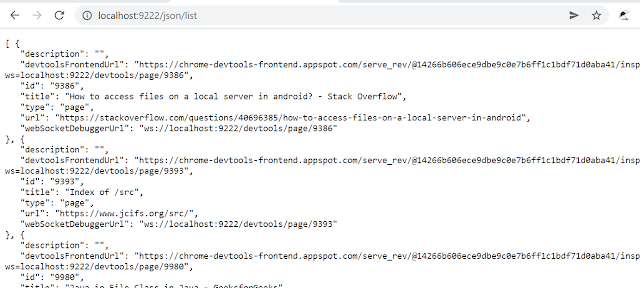
5. Verify Chrome Remote Debugger connection:
Open Chrome, browse to following URL:

http://localhost:9222/json/list

Output should be similar as follows:


6. Parse the JSON & save to file:

If you have JQ tool installed you could parse this JSON, extract only URLs and save in txt file like that:

Install JQ if not already installed, using Chocolaty or preference:

e.g: 


7. Save JSON as list of links file:


8. Open file, copy and paste all urls as new tabs using Copy Urls or use export file as needed. "Bookmark All Tabs" can then be used to save all bookmarks at once.


 Open All Tabs from Android Chrome to Windows Chrome:

Ensure sync Open Tabs is ON in settings | Manage what you sync:


– Open Chrome on your desktop (you must log into the same account as on your Android Phone/Tablet).
– In a new tab/window, press Ctrl+H.
– Click “Tabs from other devices” and you will see all your opened tabs.


– Click “Actions” or 3 dots.
– Click “Open All” and all your opened tabs from your Android Phone/Tablet should open on your Chrome desktop.
– Press Ctrl+Shift+D to “Bookmark all tabs”.
– Select a folder and click “Save”.


Thursday, June 24, 2021

Android 11 / LG Bloatware Uninstall/Disable to boost performance

 Android 11 / LG Bloatware Uninstall/Disable to boost performance :

Use as needed:


Adb Commands : Uninstall & Disable

https://www.xda-developers.com/uninstall-carrier-oem-bloatware-without-root-access/

https://www.droidwin.com/remove-uninstall-bloatware-apps-from-android-via-adb-commands/#Disable_Bloatware_Apps_on_Android

1. Disable:

Adb shell | pm disable com.lge.lgfota.permission

pm disable-user

2. UnInstall:

1. adb shell pm uninstall com.att.mobilesecurity

2. adb shell pm uninstall --user 0 com.att.mobilesecurity

These two flags respectively specify that the system app will only be uninstalled for the current user (and not all users, which is something that requires root access) and that the cache/data of the system application will be preserved  

3. pm uninstall -k --user 0 com.android.service

keep app data

Disable OTA Updates:

1. Adb shell | pm disable com.lge.lgfota.permission

2. Developer Options | Disable Automatic Updates

3. Package Disabler | Disable LG Update Center

V60 Remove Bloatware

See :

https://forum.xda-developers.com/t/no-root-needed-remove-bloatware-from-lg-v60-tmobile-or-att.4244333/

*TMobile Bloat

pm uninstall -k --user 0 com.tmobile.pr.mytmobile

pm uninstall -k --user 0 com.tmobile.m1

pm uninstall -k --user 0 com.tmobile.pr.mytmobile

pm uninstall -k --user 0 com.tmobile.pr.adapt

pm uninstall -k --user 0 com.tmobile.rsuadapter.qualcomm

pm uninstall -k --user 0 com.tmobile.rsuapp

pm uninstall -k --user 0 com.tmobile.rsusrv

               *Google/FB Bloat

pm disable-user com.nextradioapp.nextradio

pm disable-user com.google.android.music

pm disable-user com.google.android.videos

pm disable-user com.google.android.videos

pm disable-user com.google.android.videos

pm disable-user com.google.android.videos

pm disable-user com.facebook.system

pm disable-user com.facebook.appmanager

pm disable-user com.facebook.katana

                 *LG Bloat

pm uninstall -k --user 0 com.lge.theme.highcontrast

pm uninstall -k --user 0 com.lge.qmemoplus

pm uninstall -k --user 0 com.lge.qhelp

pm uninstall -k --user 0 com.lge.qhelp.application

pm uninstall -k --user 0 com.lge.bnr

pm uninstall -k --user 0 com.lge.bnr.launcher

pm uninstall -k --user 0 com.lge.music

pm uninstall -k --user 0 com.lge.email

pm uninstall -k --user 0 com.lge.exchange

pm uninstall -k --user 0 com.lge.sync

pm uninstall -k --user 0 com.lge.ia.task.informant

pm uninstall -k --user 0 com.lge.leccp

pm disable-user com.google.android.apps.tachyon //google pay

pm disable-user com.lge.fmradio

pm disable-user com.lge.lgbroadcastradioservice

pm uninstall -k --user 0 com.lge.lifetracker

pm uninstall -k --user 0 com.lge.lgworld

-- MISC TODO (Optional for me)

*Google Bloatware

pm uninstall -k --user 0 com.google.android.googlequicksearchbox

pm uninstall -k --user 0 com.google.android.gm

pm uninstall -k --user 0 com.google.android.apps.tachyon

pm uninstall -k --user 0 com.google.android.music

pm uninstall -k --user 0 com.google.android.apps.docs

pm uninstall -k --user 0 com.google.android.apps.maps

pm uninstall -k --user 0 com.android.chrome

pm uninstall -k --user 0 com.google.android.apps.photos

pm uninstall -k --user 0 com.google.vr.vrcore

pm uninstall -k --user 0 com.google.android.youtube

pm uninstall -k --user 0 com.google.android.videos

pm uninstall -k --user 0 com.google.android.talk

pm uninstall -k --user 0 com.google.android.apps.books

pm uninstall -k --user 0 com.google.android.apps.magazines

pm uninstall -k --user 0 com.google.android.apps.plus

* amazon

pm uninstall -k --user 0 com.amazon.mShop.android

pm uninstall -k --user 0 com.amazon.fv

pm uninstall -k --user 0 com.amazon.kindle

pm uninstall -k --user 0 com.amazon.mp3

pm uninstall -k --user 0 com.amazon.venezia


Enable Chrome+Edge Flags

chrome://flags/#smooth-scrolling

chrome://flags/#heavy-ad-privacy-mitigations

chrome://flags/#heavy-ad-privacy-mitigations

chrome://flags/#enable-android-dark-search

chrome://flags/#enable-force-dark

chrome://flags/#heavy-ad-privacy-mitigations

chrome://flags/#enable-zero-copy

chrome://flags/#enable-gpu-rasterization

chrome://flags/#smooth-scrolling

Friday, June 11, 2021

Android Disable System Updates : Disable the message "Install update keep device running smoothly"

Stop the "Install update keep device running smoothly" message"; 
  1. How do I stop google play services auto update? 
Yes it is possible to stop it from auto updating itself.follow these steps to do that:-


. Go to setting


. Tap on data usage option


. Scroll down and find Google play services


. Tap on it then scroll down and put a check on Restrict background data option


. Now it's only update when you manually update it.


. You can use this method for any app and also revert it anytime.

 OR 

  2. Block System Update 


To do it follow these steps if you are on Lollipop or higher.


The update notifications usually comes on your notification bar and cannot be removed by swiping to left or right. You can either skip it by giving a time limit.

When the notification comes, pull down the notification pannel and long press on the update notification.

You will see a setting logo to the right side of the notification.

Press that and go the update notification settings.

There will be a toggle for blocking all notification from this app. Turn on that toggle and you won't get any more notifications.


 OR 

  3. Option 3 

Go to Settings > Apps.

Navigate to Manage Apps > All Apps.

Find an app called Software Update, System Updates or anything similar, since different device manufacturers have named it different.

To disable system update, try any of these two methods, the first one being recommended:

Tap Turn Off or Disable button and then OK.

In case this button is grayed out, tap on Force Stop > OK to turn the process off temporarily. In such case, there is a possibility that the app may turn on automatically

Disable any update notifications by unchecking “Show Notifications” checkbox in supported devices.


And Android Apps in general, more info here
https://www.alphr.com/disable-updates-android-device/

Wednesday, April 7, 2021

Keyboard Shortcuts for Android Emulator : srccpy

Summary

 srccpy is a great screen mirroring application to emulate Android on a PC. Open Source, stable, well documented and feature rich are some of the highlights of srccpy  making it one of the best choices for mirroring and/or remoting to Android from a PC. 

Here are a list of PC keyboard shortcuts and the matching Android gestures, these are very important to augment & complete the experience of remote controlling an Android device from a PC. 

Prerequisites

Here are 2 YouTube videos on how to setup scrcpy, 

1) install and setup USB connection to Android and then 

2) setup wireless connection to Android.  


Keyboard Shortcuts

Click on HOME - Mouse Middle-click

Click on BACK - Mouse Right-click

Click on APP_SWITCH - Win+s

Click on MENU (unlock screen) - Win+m

Click on VOLUME_UP - Win+↑ (up)

Click on VOLUME_DOWN - Win+↓ (down)

Click on POWER - Win+p

Power on - Mouse Right-click

Turn the device screen off

but keep mirroring - Win+o

Turn device screen on - Win+Shift+o

Rotate device screen - Win+r

Expand notification panel - Win+n

Collapse notification panel - Win+Shift+n

Copy to clipboard - Win+c

Cut to clipboard - Win+x

Synchronize clipboards and paste - Win+v

Inject computer clipboard text - Win+Shift+v

Enable/disable FPS counter - Win+i

Pinch-to-zoom - Ctrl+click-and-move

Wednesday, March 31, 2021

Tasker Error edit or create a Profile: Attempt to invoke virtual method '..' Error


Summary

The following error started to appear in my Android tasker V 5.11.14 on Oreo any time I added or edited a Profile. This error results in the inability to edit or create a profile tasker, thus a user is unable to do automate any task. This is a major problem.

The following Resolution worked for me to resolve this issue:


Error:

Error text:

Attempt to invoke virtual method 'android.os.IBinder android.view.View.getApplicationWindowToken()' on a null


Depiction of Error

https://prnt.sc/110jjr9


Resolution

Disable the Setting: Settings | Developer options | Toggle the "Don't Keep Activities" setting


Monday, December 7, 2020

Bookmark Management Productivity Tool Review: Focus on YouTube Time Stamp bookmarks.

Summary:

I am seeking an easy to use, feature rich yet clean link management tool with some basic collaboration features and video timestamp compatibility functionality. In short I need a tool to help save video time stamps, take notes on those time stamps and organize the links into categories. This helps with research and/or education activities. Specifically I need a tool that allows me to save YouTube time stamp bookmarks and then easily play them back. I compared several tools in 2020. Below are ratings for most of the tools that I used including comments on usage & screen recordings that demo each app. Specifically I am seeking the following features:

1) Link management : save, tag, organize links

2) Has an Android App

3) Has a PC App / Chrome Extension

4) Allow Save and Play of time stamped video links.

5) Basic collaboration

Winners : Diigo and KeepLink

get an Intro into the world of Bookmarking Tools

Details

1. Linkeep:

Rating: 3

Android App: Y; Chrome Extension: N; Web App: N; PC Install: Y

Comments: Android basic functionality, no share to option. PC requires an install.

Screen Recording Demos:

Android Usage:
PC Usage:

2. KeepLink: LinksSaver

Rating: 2

Android App: Y; Chrome Extension: N; Web App: N; PC Install: Y

Comments: Copy of Linkeep, looks and functions almost 100% the same. Only colors on UI are different.

Screen Recording Demos:

Android Usage:
PC Usage:

3. MyLinks

Rating: 3

Android App: Y; Chrome Extension: N; Web App: N; PC Install: N

Comments: Android app is great, integration between NewPipe, YouTube is clean and the UI is clean and concise with Categories and Links, The only complaint I have is search is limited to Categories only. On the PC side: I could not find any way to access links. I would use this app if it had a PC option?

Screen Recording Demos:

Android Usage:

4. Keeplink: Links/Bookmarks

Rating: 2

Android App: Y; Chrome Extension: N; Web App: N; PC Install: Y

Comments: Seems like a clone of another link app like Keep Link Links Saver or vice versa. The integration with NewPipe & YouTube does not work; you can not share to KeepLink. Thus I had to create links manually, that on top of the mediocre UI and not PC option leaves me no option except to give it a 2 or 3.

Screen Recording Demos:

Android Usage:

5. Pocket

Rating: 3.5

Android App: Y; Chrome Extension: Y; Web App: N; PC Install: Y

Comments: Very feature rich productivity tool that includes more than just link management: this tool allows user to save, share and manage articles & links in lists. Its does exactly as it claims “Save the articles, new stories and videos you want to read and watch later to Pocket. “ Pocket also integrates ok with NewPipe and YoutTube, however there are some gotchas. Each list item has a category and includes tagging & favorite features plus more. On the PC side, a Chrome Extension provides near identical functionality to the app. If you are looking for a producutivy app to manage articles & vidoes this is an alternative to Diigo. IMHO it is not as feature rich as Diigo.

Cons: However, there are 2 BIG issues that prevent me from using pocket: 1) Saving a video link:No description/notes when saving a link and 2) Opening a Video Link: When I open it link in Andorid or PC the video goes to the 00:00 ignoring my timestamp. The Timestamp is only used if I share the list item to YouTube.

When saving a link (NewPipe or YouTube Share to Pocket) I can select a tag and nothing else. In short this tool is not timestamp friendly if you are saving several links in the same video.

Screen Recording Demos:

Android Usage:
PC Usage

6. Keep Link

Rating: 4

Android App: Y; Chrome Extension: Y; Web App: N; PC Install: Y

Comments: Save bookmarks from anywhere easily and quickly. KeepLink is great at saving links. The Android app is very clean and it does 1 job very well: Saving & managing book marks. The UI in Android is modern and clean, rounded corners & searching is a great feature in this tool allowing multiple fields to search on. Bookmarked items include description, title, tag and category. Tag and category properties are extensible allowing user defined values for each.

Cons: There is only 1 list in the Lists. Having 100’s of items may become unwieldy. There is no PC / Chrome Extension I could in thus I was unable to use the bookmarks on a PC without copying/sharing from my phone to my email & opening on a PC. Hopefully this will be resolved in the future.

Screen Recording Demos:

Android Usage:

7. Diigo

Rating: 5

Android App: Y; Chrome Extension: Y; Web App: Y; PC Install: N

Comments: Extremely feature rich link, annotation and collaboration tool that includes all of my requested functionality and more. Annotations, tagging, description, notes, collaboration groups and seamless Android integration are all included in Diigo. The only tool that comes close is Pocket in terms of number of features and KeepLink in terms of the UI. Diigo does exactly what it claims to do and more: “Diigo Browser allows you to save, annotate and share bookmarks easily!”. Saved bookmark items including title, url, description, tag & group. Tag and group properties are extensible allowing user defined values for each. Group permits customizable authorization via an Admin setting, this feature permits expanded collaboration on items, articles, notes and annotations. This allows multiple users to edit an item, great for small teams working on research.

In android, sharing from NewPipe and YouTube to Diigo for time stamped links works perfectly and playing time stamped links open to the correct time marker on both PC and android.

Cons: The android app is a little clunky, due to it being its own browser. It just takes a little time to get use to. I recommend using the Chrome Extension first then using the Android app, this will decrease the learning curve.

Screen Recording Demos:

Android Usage using Saved Link

Android Usage saving a Link:
PC Usage

More Info:

Overview of Similar Tools

Diigo Guide: Its awesome!

Wednesday, November 25, 2020

Tasker: Install on new phone then restore settings, permissions and configuration:

Tasker: Install on new phone and restore settings, permissions and configuration: including profiles, actions and settings. Some manual steps are involved + adb commands from PC. Assumes adb is setup from PC with basics of adb understood by user.


[Old Phone]


1. Backup Tasker apk
2. Backup config (backup.xml) using menu Tasker | Data | Export.
    - in my case I am backing up to a network drive.
    - new phone will access apk and backup.xml
    - result as follows:
        http://prntscr.com/vpo4uu


[New Phone]


3. Install apk on new phone       

4. Configure other task manager style apps to whitelist tasker
    e.g: "all-in-one toolbox" android
    "boot speedup"
    http://prntscr.com/vpnkqj

    Advanced Tasker White List
     http://prntscr.com/vpnkj3

5. Set Tasker Settings
    Tasker Settings:
    http://prntscr.com/vpnofj

    Task Settings: SD Card
    http://prntscr.com/vpnosg

5. Set Android Permissions
    Android Permissions
    http://prntscr.com/vpnzt3
    http://prntscr.com/vpo0b2
    http://prntscr.com/vpo0i6

6. Connect phone to PC, Run adb,  Set permissions via Adb

-- See below links
https://tasker.joaoapps.com/userguide/en/help/ah_adb_wifi.html
https://tasker.joaoapps.com/userguide/en/help/ah_read_logs_grant.html
https://www.reddit.com/r/tasker/comments/9u6fbr/tasker_storage_access/
https://tasker.joaoapps.com/knownissues.html

- Sample Command output
C:\WINDOWS\system32>adb devices
List of devices attached
LMV405TA76466767        device


C:\WINDOWS\system32>adb tcpip 5555
restarting in TCP mode port: 5555

C:\WINDOWS\system32>adb shell pm grant net.dinglisch.android.taskerm android.permission.READ_LOGS

C:\WINDOWS\system32>adb shell am force-stop net.dinglisch.android.taskerm

C:\WINDOWS\system32>adb shell pm grant net.dinglisch.android.taskerm android.permission.WRITE_SECURE_SETTINGS


7. Run test actions
    - File Copy
    - Turn Airplane Mode on and Off
    - Ect

Monday, November 2, 2020

Compare Android Receipt Tracking Apps: Best & Worst Scan + OCR Receipt Apps for Small Business

Finding the Best and Worst Android Receipt Management Apps with a focus on Scan, OCR & small business functionality,.


Summary

The following review focuses on finding a stable and affordable receipt tracking app that includes the following functionality either in the app directly or via the browser. Scan & OCR functions must reside in native app while reporting & settings may exist in browser. This is a summary review focusing on OCR accuracy, ease of use & functionality that can satisfy tax related use cases for small business/sole-proprietor.

Requirements

1. Ability to scan a receipt via phone camera

2. OCR Capability for scanned receipts

3. OCR accuracy is > 90%

4. OCR picks up minimally following fields:

a. Pricve

b. Date of transaction

c. Merchant / Store Name

d. Category – Filled 90% with accuracy at or above 50%

5. Scan & OCR will involve at most 2 user events: Camera Click & Button Click.

6. Pricing either :

a. Subscription of < 5$ per month for 1-2 user or

b. 100$ one time for life of product

7. Ability to create simple report &/or export including:

a. Transaction detail

b. Transaction Summary

8. Reports shall allow user to filter by Start / End Date

9. Export Report to csv

Optional / Nice To haves:

1. Ability to identify / resolve / merge duplicates

2. Ability to scan a receipt via email

3. Search feature allowing to find tx by merchant, amount and/or category

4. Customer service with chat capability or email response

5. Ability to import from another expense platform, E.g: Import from Expensify.

The following apps were downloaded & tested on Android 10 Kernel Version 4.9.193 on LG V40 model V405TA30b :

Test Case:

1. Create Account

2. Create 3 receipts: Scan & OCR, see #6 below

3. Verify fields populated by OCR:

Date

Merchant

Amount

Category

4. How many events to create a receipt?

5. What is the pricing amount & pricing model?

6. Sample Receipts used in testing

Test Results

Apps failed due to 1 or more of the following conditions, noted by the leading symbol below : , denoted with leading in

1 - OCR in-accurate or non-existent

2 - pricing exceeds 5$ per month or $120 per year

BEST of the BEST

1tap receipts Tax Calculator & Receipt Scanner

Test Results Notes:

1. Create Account - Easy, Google OAuth.

2. Create 3 receipts: Scan & OCR. - 1 step; process time: <1 hr

3. Verify fields populated by OCR: (% of 3 receipts)

Date - 100%

Merchant - 100%

Amount - 100%

Category - 100% Accurate!

4. How many events to create a receipt?

- 1 !

5. What is the pricing amount & model for app?

- $2.08 per MONTH! Billed annually!

Pricing Details:

More Info: support@1tap.zendesk.com

6. Ease of Use: - High

7. Pros: - Very accurate & fast, simple UI, great fit for small business who wants no frills & hughly accureate OCR receipt scanning

8. Cons: basic reporting, limited filtering, did not see a way to search for a receipt. Not

Receipt Scanner: smart receipts & expense tracker

Test Results Notes:

1. Create Account - Easy, Email.

2. Create 3 receipts: Scan & OCR. - 1 step; process time: <1 hr

3. Verify fields populated by OCR: (% of 3 receipts)

Date - 100%

Merchant - 100%

Amount - 100%

Category - 100% Accurate!

4. How many events to create a receipt?

- 1 !

5. What is the pricing amount & model for app?

- $3/ month paid yearly !

Pricing Details:

More Info: contact@easy-expense.com

6. Ease of Use: - High

7. Pros: - Very accurate & fast, Clean & simple UI, great summary dashboard. Info on importing: Break expensed into Biz/personal

8. Cons: limited browser, in work.

BEST

Zoho Expense - Expense Reporting and Approval

Test Results Notes:

1. Create Account - Easy, Google OAuth.

2. Create 3 receipts: Scan & OCR. - 1 step; process time: <1 hr

3. Verify fields populated by OCR: (% of 3 receipts)

Date - 100%

Merchant - 100%

Amount - 100%

Category - 0% Accurate!

http://prntscr.com/vcbpqa

4. How many events to create a receipt?

- 1 !

5. What is the pricing amount & model for app?

- 5$ per mos

6. Ease of Use: - High

7. Pros: - OCR was fast, however category not filled in, Many features for mid sized business.

8. Cons: OCR

Foreceipt - Receipt Scanner Expense Tracker Cloud

Test Results Notes:

1. Create Account - Easy, Google OAuth.

2. Create 3 receipts: Scan & OCR. - 1 step; process time: <1 hr

3. Verify fields populated by OCR: (% of 3 receipts)

Date - 100%

Merchant - 100%

Amount - 100%

Category - 0%

4. How many events to create a receipt?

- 2

5. What is the pricing amount & model for app?

- 3.99$ per mos (220 scans only)

6. Ease of Use: - High

7. Pros: - OCR was fast, however category not filled in, Many features for mid sized business.

8. Cons: OCR & pricing is only 200 scans per month

Wave Invoicing

Test Results Notes:

1. Create Account - Easy, Google OAuth.

2. Create 3 receipts: Scan & OCR. - 1 step; process time: <1 hr

3. Verify fields populated by OCR: (% of 3 receipts)

Date - 100%

Merchant - 100%

Amount - 100%

Category - 0% Accurate!

4. How many events to create a receipt?

- 1 !

5. What is the pricing amount & model for app?

- 35$ per mos

https://www.waveapps.com/pricing

6. Ease of Use: - High

7. Pros: - OCR was fast, however category not filled in, Great features for mid sized business.

8. Cons: Category OCR and price!

Expensify - Expense Reports

1. Create Account - Easy, Email or Google OAuth.

2. Create 3 receipts: Scan & OCR. - 1 step; process time: Slow > 2 hours

3. Verify fields populated by OCR: (% of 3 receipts)

Date - 100%

Merchant - 100%

Amount - 100%

Category - 50%

4. How many events to create a receipt?

http://prntscr.com/vcbumb

- 1 !

5. What is the pricing amount & model for app?

- 4.99$ per mos

https://www.expensify.com/pricingw

6. Ease of Use: - High

7. Pros: - OCR was slow, but accurate. Most fields filled in, duplicates management. Great features for mid sized business.

8. Cons: OCR is slow, Fees & overcharging, customer service.

WORST: Worst / Not applicable

Fyle: Receipt Scanner & Expense Reports


fail reason: 1

Chrome River


fail reason: 2

Abacus


fail reason: 2

SAP Concur


fail reason: 2

Volopay


fail reason: 2

Veryfi - expenses, receipts & projects


fail reason: 2

Foreceipt - Receipt Scanner Expense Tracker Cloud


fail reason: 1

Smart Receipts


fail reason: 1

Receipt Bank


fail reason: 1

QuickBooks Online Accounting, Invoicing & Expenses


fail reason: 2

Free Expense Tracker & Budget Planner - Bookipi


fail reason: 1

MrReceipt - your receipts in one place


fail reason: 1

Receipt Box


fail reason: 1

Smart Receipts


fail reason: 1

Easy Receipt Log


fail reason: 1

Import Export Links:


Test Results Details & Figures:

1Tap:

Browser/Admin UI:

https://my.1tap.io/my-expenses/overview/2020


Report Request


Report Output


OCR Results:


Easy-Expense:          

Browser/Admin UI:

https://app.easy-expense.com/

OCR Results:


 Dashboard


Export:


Easy Expense Import


Expensify: