1. Tweak the following Express VPN Settings
2. Close all
3. Open Express VPN, Connect
4. Ensure VPN Connection is working
5. Open Connectify select the ExpressVPN TapAdapter
*** this does NOT work on any Surface due MS dropping hostednetwork


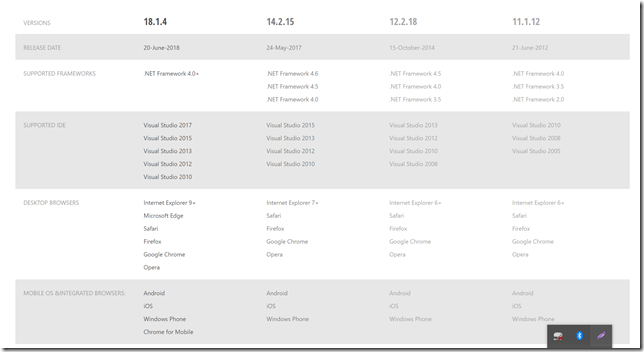
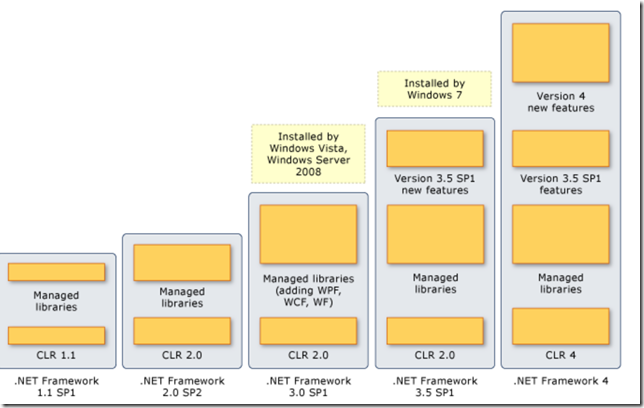
Each version of Visual Studio prior to Visual Studio 2010 is tied to a specific .NET framework. (VS2008 –> .NET 3.5, VS2005 –> .NET 2.0, VS2003 –> .NET1.1) Visual Studio 2010+ allows targeting of older .Net FW, but can’t be used for future .Net FW. For .Net 4.5+ we must use VS2012+, see below tables showing dependency mapping.
References:
Install Links for all .Net FW : Developer and Distribution Package
MS VS and .Net Version and Dependency Guide Detail
| .NET Framework version | Desc | VS.NET | OS |
| 4.7.2 | -Crypto+Asp.Net. | N/A | 10,8.1,7; Svr: 2016, 2012, 2008R2Sp1 |
| 4.7.1 | SHA/TryParse. | N/A | 10,8.1,7; Svr: 2016, 2012, 2008R2Sp1 |
| 4.7 | JSON. | 10,8.1,7; Svr: 2016, 2012, 2008R2Sp1 | |
| 4.6.2 | - Cryptography enhancements, | 10,8.1,7; Svr: 2016, 2012, 2008R2Sp1 | |
| 4.6.1 | - Support for X509 certificates | + 10 | |
| 4.6 | - Compilation using .NET Native | 2015,. | 10,8.1,7,Vista; Svr: 2016, 2012, 2008R2Sp1 |
| 4.5.2 | Tx Support | - | 8.1,7; Svr: 2012, 2008R2Sp1 |
| 4.5.1 | - Support for Windows Phone Store apps | 2013 | 8.1,7, Vista; Svr: 2012, 2008R2Sp1 |
| 4.5 | - Support for Windows Store apps | 2012 | 8,7, Vista; Svr: 2012, 2008R2Sp1 |
| 4 | - Expanded base class libraries | 2010 | 8,7, Vista; Svr: 2012, 2008R2Sp1 |
| 3.5 | - AJAX- LINQ | 2008 | 8,7, Vista; Svr: 2012, 2008R2Sp1 |
| 3.0 | - WPF, WCF, WF | - | 8,7, Vista; Svr: 2012, 2008R2Sp1 |
| 2.0 | - Generics | 2005 | - |
| 1.1 | - ASP.NET and ADO.NET | 2003 | - |
| 1.0 | First version of the .NET Framework. | Visual Studio .NET | - |
.
| .NET Framework version | CLR version | VS IDE version | Description |
| 1.0 | 1.0 | Visual Studio .NET | Contained the first version of the CLR and the first version of the base class libraries. |
| 1.1 | 1.1 | VS2003 | Included updates to ASP.NET and ADO.NET.Has (SP1) and SP2. |
| 2.0, 3.0 | 2.0, 3.0 | VS2005 | generics, generic collections, Has SP1 and SP2. |
| 3.5 | 2.0 | VS2008 | AJAX-enabled Web sites LINQ. Has SP1 |
| 4 | 4 | Visual Studio 2010 | (MEF), (DLR), and code contracts. |
| .NET Framework versions | Windows versions |
| 1.0, 1.1, and 2.0 | No OS |
| 3.0, 2.0SP2, 3.5 | Windows Vista and Windows Server 2008. |
| 3.5 SP1 | Windows 7. |
| 4 | Compat Windows XP, Windows Server 2003+ |
REM: Purge files
FORFILES /S /D -20 /C "cmd /c IF @isdir == FALSE del /F /Q @path"
REM: Purge folders
FORFILES /S /D -30 /C "cmd /c IF @isdir == TRUE rd /S /Q @path"
So..Say you want to block all internet connections for an exe(s) in a Windows folder, this bat file will Block All Internet connections save below cmds to a bat file, save to a folder with the exe(s) you want to block, and then Run this bat file. Voila!
@ setlocal enableextensions
@ cd /d "%~dp0"

for /R %%a in (*.exe) do (

netsh advfirewall firewall add rule name="Blocked with Batchfile %%a" dir=out program="%%a" action=block

)