Sunday, November 25, 2018

Gmail: Using Google Apps Script to Auto Delete Gmail Trash on a schedule! (or anything else for that matter)


1) Create Script

2) test

3) Schedule


Some really cool stuff we can do using Google Developers Dashboard, some references here:

https://gist.github.com/balupton/9800939

and

https://www.mikecr.it/ramblings/marking-gmail-read-with-apps-script/


for my case I need to purge the Trash every Sunday, to do this:

Summary as follows:

1) Create a script to clean Trash label (folder)

function deleteForever() {

  Logger.log('START ');
   var labelName = "Trash"

  var threads = GmailApp.search("in:trash label:" + labelName);
   for (var i = 0; i < threads.length; i++) {
    Logger.log('Delete id ' +  threads[i].getId());
      try {
         Gmail.Users.Messages.remove('me', threads[i].getId());
      }
      catch(e){}
      Logger.log('DONE Delete id ' +  threads[i].getId());
   }
}


2) To enable advanced services for this script, locate Resources on the menu, and select Advanced Google services...

3) Enable Gmail API on the list.

4) Before selecting OK, click on the Google Developers Dashboard link. Search for gmail, and enable

5) Schedule via a trigger:


FYI:

If new to G Scripting, use logging per this spec


Basic logging

A basic approach to logging in Apps Script is to use the built-in Logger. Logs created this way can be viewed by selecting View > Logs in the script editor. These logs are intended for simple checks during development and debugging, and do not persist very long.

For example, consider this function:

function emailDataRow(rowNumber, email) {
  Logger.log('Emailing data row ' + rowNumber + ' to ' + email);
  var sheet = SpreadsheetApp.getActiveSheet();
  var data = sheet.getDataRange().getValues();
  var rowData = data[rowNumber-1].join(" ");
  Logger.log('Row ' + rowNumber + ' data: ' + rowData);
  MailApp.sendEmail(email,
                    'Data in row ' + rowNumber,
                    rowData);
}

When this script is run with inputs "2" and "john@example.com" the following logs are written:

[16-09-12 13:50:42:193 PDT] Emailing data row 2 to john@example.com
[16-09-12 13:50:42:271 PDT] Row 2 data: Cost 103.24

The Logger.log() method expects a string or other JavaScript object. The logs can only hold a limited amount of data, so avoid logging large amounts of text.

Tuesday, November 20, 2018

Excel Copy Cell Function without changing cell reference?

Normally when we copy/paste excel function, on paste the cell reference is adjusted for the

context of where we are pasting to.

For example:

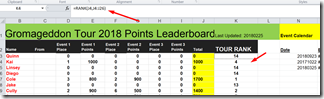
Copy : from K3: =RANK(J3,J3:J25)

image

To: to K4: =RANK(J4,J4:J26)

image 


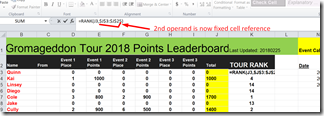
Well I want my rank to go over the ENTIRE range from J3:J25, not from a relative range of

J(n) :J25, so how do we do this? Using fixed cell references:


Change our rank to:

 image

Thursday, November 15, 2018

Fiddler HTTPS Traffic and Accept Cert for Chrome

If u have fiddler capturing traffic and yoiu receive an error:

NET::ERR_CERT_AUTHORITY_INVALID


Then perhaps you need to export Fiddler cert and import into Browser:


1. Export

2. Import into IE


Detail:

Fiddler 4.6.1.5+

  1. Click Tools > Fiddler Options.
  2. Click the HTTPS tab.
  3. Ensure that the text says Certificates generated by CertEnroll engine.
  4. Click Actions > Reset Certificates. This may take a minute.
  5. Accept all prompts


More Info Here

https://www.dropbox.com/s/dfc3mlwhtgrpg93/2018-11-16_01-04-58.mp4?dl=0

Wednesday, November 14, 2018

Best Player for Windows 10

Got tired of the GOM Ads, and CHOPPY playback, POT Player is here!!!!

IM DONE with GOM player, TOO many ads and WOW Pot player is GOM Player X 10

in regards to features!!!Best ever!

Download here:

Preferences:

See here

Guides for Pot Player

https://fossbytes.com/10-best-free-media-players-windows/
https://wiki.mikejung.biz/PotPlayer


Tweaking POTY Player Performance if needed:
https://anime.my/tutorials/configuring-potplayer-for-gpu-accelerated-video-playback-with-dxva-or-cuda-and-also-high-performance-software-decoding/#step1
https://dashcamtalk.com/forum/threads/pot-player-hardware-acceleration.8350/
https://www.youtube.com/watch?v=GSNaSro2CHk


See Preferences hereOpen-mouthed smileownload and run reg file!

Hardware and Software Driver Recover Options

Hardware and software I have and use that can be used for disk access and data recovery:


Hardware:

Slave a drive using this for example:
SATA/PATA/IDE Drive to USB 2.0 Adapter Converter Cable for 2.5 / 3.5 Inch Hard Drive / 5 inch Optical Drive with External AC Power Adapter
https://www.amazon.com/AGPtek-Drive-Adapter-Converter-External/dp/B00BIE996S/


Software


Recuva Free
https://www.ccleaner.com/recuva/features/undelete-files-on-your-computer

Anydata recovery
https://www.tenorshare.com/data-recovery/how-to-recover-deleted-data-windows-10.html

undelete:
http://www.undelete360.com/

undeleete+
https://undelete-plus.en.softonic.com/comments

Misc Info:
https://www.howtogeek.com/169344/how-to-recover-a-deleted-file-the-ultimate-guide/

Sunday, November 11, 2018

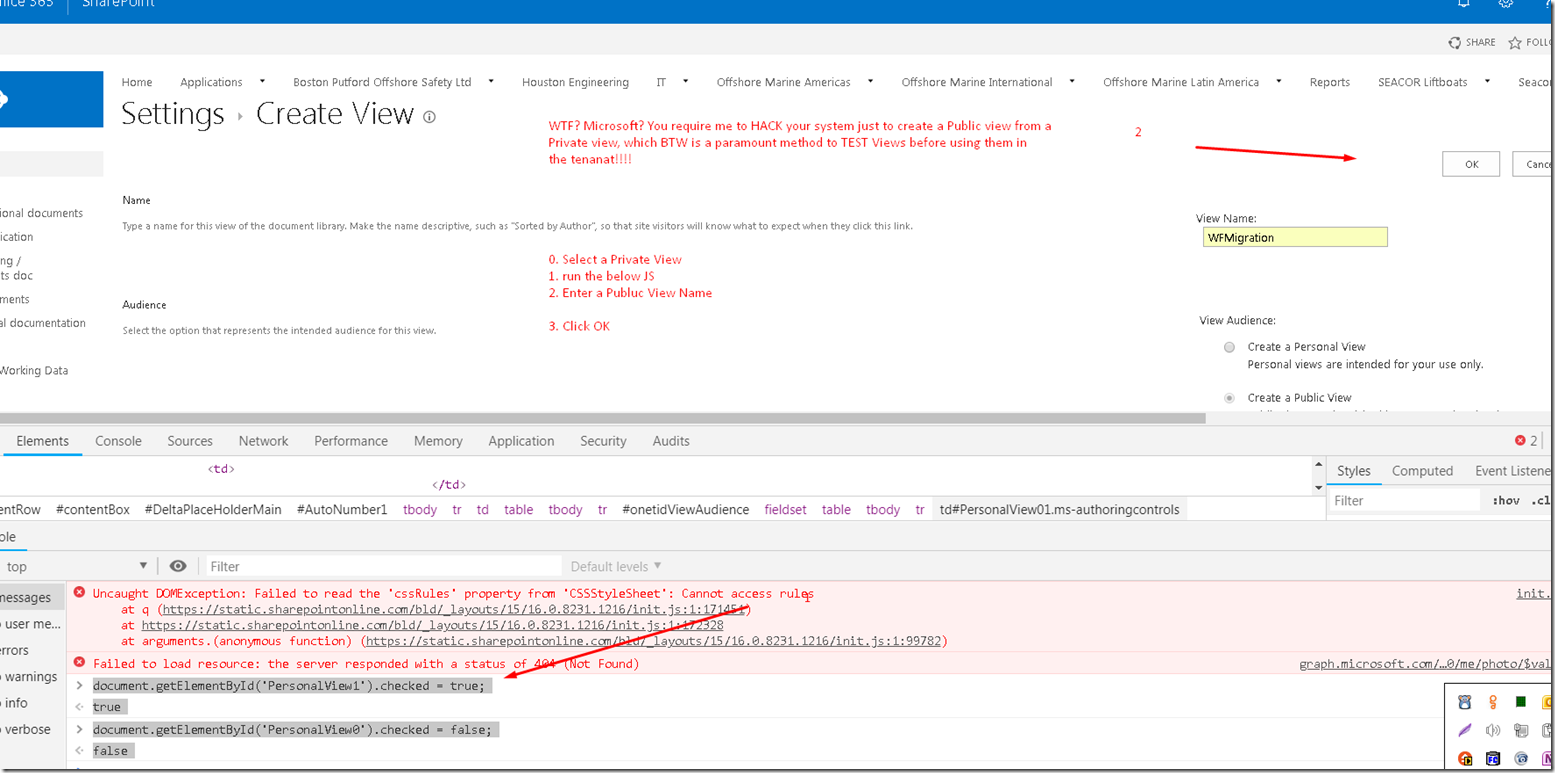
SharePoint Online Create a Public View from a Private View: Requires a JS HACK …Wow

  1. Click on Create View.
  2. Select your private view.
  3. Use either 'Developer Tool' if you are using IE or 'Firebug' if you are using Firefox. ...
  4. Remove the attribute 'disabled' from the radion button.
  5. Add a new attribute 'checked="checked"' to the radio button.
  6. Now save you view and you are done.

image

Wednesday, November 7, 2018

VLC Disable Album Art

OK, found it myself. Too bad so many have asked and nobody has bothered to answer.
Here it is:

Open "C:\Users\[User]\AppData\Roaming\vlc\vlcrc"
Find:
# Display background cone or art (boolean)
#qt-bgcone=1
Change to:
# Display background cone or art (boolean)
qt-bgcone=0


U should now see this in debug window:

image